

Slicer audits entire websites and user flows, giving teams a structured way to review UI/UX at scale — then extracts any component it finds into ready-to-use AI prompts or React code.
What it costs
- Free tier
- Yes
- Paid plans from
- €15/mo
Free covers 3 component copies and 1 journey audit (up to 5 screens) a month — enough to trial, not to work with. Lite €15/mo (30 copies, 5 audits), Pro €25/mo (unlimited copies, 20 audits), Max €35/mo uncapped. All paid plans carry a 14-day money-back guarantee.
Prices checked on 5 September 2026Source

About Slicer.dev
Slicer.dev: Copy Any Live Web Component into React or an AI Prompt
Slicer is a browser extension that turns any component on any live website into something you can actually build with. You open it on a page, every element becomes selectable, and a single click copies the component you want — with its styles, hover states, CSS animations, interactions and responsive layout preserved. What comes back is deliberately not raw markup. Slicer's own argument is that "raw HTML is messy and useless in an AI builder", so the output is either clean React code or a structured prompt written for Claude Code, Cursor, Lovable and Bolt.new. Sitting alongside the extraction tools is a second, separate feature: Journey Audit, which records an entire user flow as you browse it and runs an AI UX review across the result.
Key Features
- One-click component capture — Open the extension on any page and every component becomes selectable; click one to copy it whole.
- React or AI-prompt output — Export as clean React, or as a structured prompt built for Claude Code, Cursor, Lovable and Bolt.new instead of unusable markup.
- Fidelity past the screenshot — Hover states, CSS animations, interactions and responsive layouts carry across automatically rather than needing to be rebuilt by hand.
- Canvas — An infinite canvas for working with what you've captured: merge components into one, apply your own brand, restyle with AI, generate new variants, or debrand and neutralise something before reusing it.
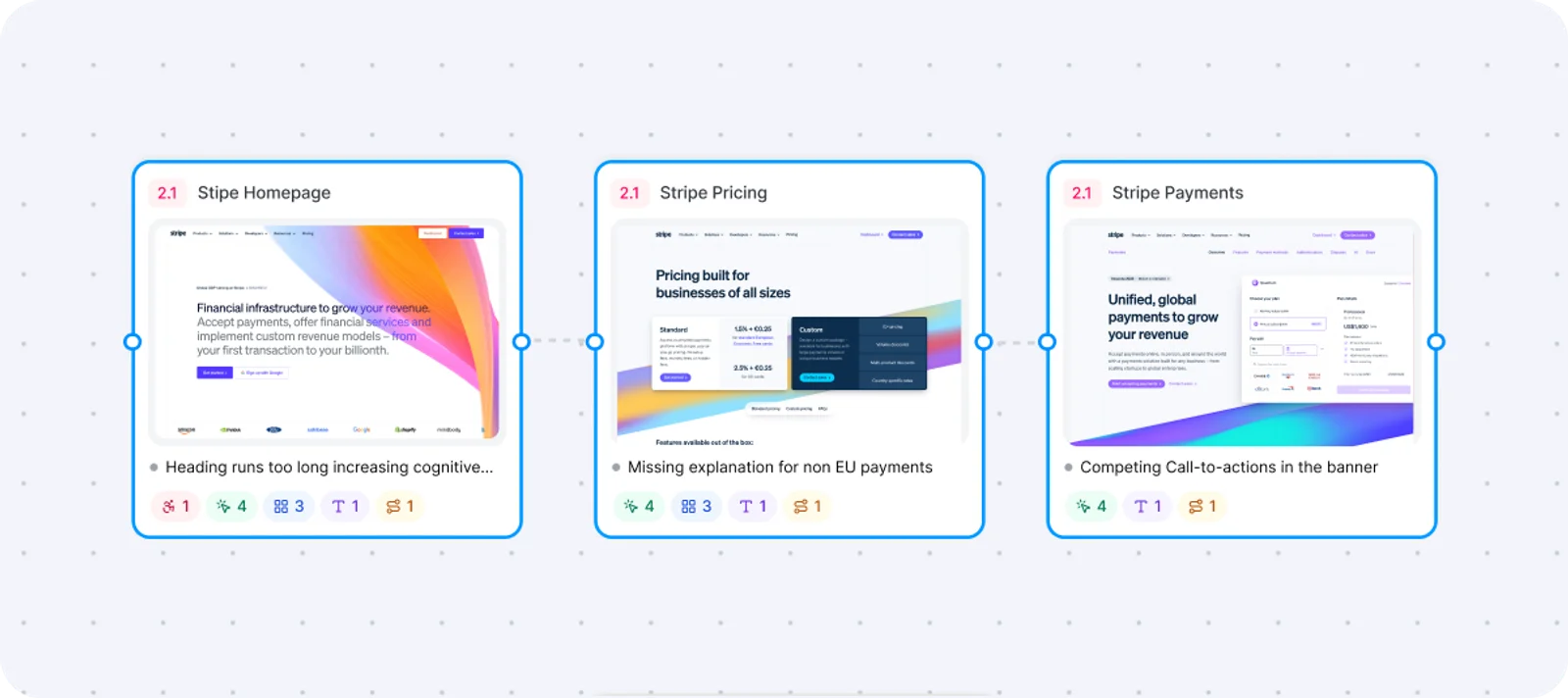
- Journey Audit (beta) — Record a signup, checkout or onboarding flow page by page, get a board mapping the whole journey, then run an AI UX audit with findings pinned to the pages they belong to.
- A free tier with no deadline — Three component copies and one journey audit every month at no cost, rather than a trial that expires.
How Slicer Works
The workflow is built around not leaving the page you are looking at. You install the extension from the Chrome Web Store, open it on any live site, and the page becomes selectable component by component. Clicking captures the piece you want, and Slicer resolves it into a structured representation rather than dumping the DOM — which is the whole point, because a paste of raw HTML into an AI builder tends to produce something that neither compiles nor resembles the original. From there you either take clean React straight into a codebase, or take the generated prompt into whichever AI tool you already work in and let it build the component in your own stack and conventions.
Canvas: Reworking What You Capture
Captured components land on an infinite canvas where they stop being fixed copies. You can merge several slices into a single component, apply your brand's visual style across them, or strip a component's branding entirely to leave a neutral starting point. AI restyling and variant generation sit in the same place, so the path from "this pattern works" to "this pattern works, in our design language" doesn't involve rebuilding it from scratch. In practice this is what separates Slicer from a screenshot tool: the captured component stays editable.
Journey Audit: Reviewing a Flow, Not a Page
Journey Audit, currently in beta, is aimed at a different job from component extraction. Rather than capturing one element, it records pages as you move through a flow — signup, checkout, onboarding — and assembles them into a board that maps the whole journey end to end. An AI UX audit then runs across that board, pinning its findings to the specific pages they relate to. Slicer positions this at UX research, product reviews and competitor analysis, which is the more honest framing: it is a structured way to review a flow at scale, not a replacement for testing with real users.
Plans and What the Free Tier Actually Covers
Slicer is freemium, and the free plan is a genuine free plan rather than a countdown: three component copies and one journey audit of up to five screens, every month. That is enough to evaluate it properly and not enough to work with day to day, which is the trade-off to go in expecting. Lite is €15/month for 30 copies and 5 audits, Pro is €25/month for unlimited copies and 20 audits, and Max is €35/month with both uncapped. All paid plans carry a 14-day money-back guarantee.
How to Copy a Component with Slicer
- Install the Slicer extension and open it on any live website.
- Hover the page — components become selectable — and click the one you want.
- Choose your output: clean React code, or a prompt for Claude Code, Cursor, Lovable or Bolt.new.
- Optionally send it to the Canvas first to merge, rebrand, debrand or generate variants.
- Paste the result into your codebase or AI builder and keep building.
Who It's For
- Developers who prototype in AI builders and want a real component as the starting point instead of a description of one
- Designers gathering interaction and animation patterns from live products rather than static screenshots
- Product and UX teams auditing a signup, checkout or onboarding flow end to end
- Anyone doing competitor analysis who needs the flow documented, not just a folder of screen grabs
- Front-end engineers rebuilding a pattern who would rather start from working styles than from scratch
Conclusion
Slicer's useful idea is that the gap between seeing a component you like and having one you can use is mostly mechanical work — reading styles, catching hover states, guessing at breakpoints — and that an extension sitting on the live page is better placed to do it than a person with devtools open. The React and AI-prompt outputs make it fit either a hand-written codebase or an AI-assisted one, and Journey Audit extends the same idea from single components to whole flows. The free tier is small but real, so it costs nothing to find out whether the captured output is clean enough for the way you work.
Featured Tools
Sponsored
Artlist
Royalty-free music, SFX, 8K footage, templates, LUTs and 100+ AI models on a single subscription for video creators.

Icons8
Large icon packs featuring over 10,000 icons for consistent design themes.

Vidu
AI video generator with text, image and reference-to-video modes, producing 3–16 second clips at up to 1080p with characters that stay consistent across shots.
Your tool here
The tools above are our own picks until the slots sell.
Spotlight
SponsoredRotates daily
Kittl
AI-first design platform with image, vector, and video generation, plus templates, mockups, and print-ready exports.
Tools we recommend


Editorially chosen. Some links above are affiliate links — if you sign up we may earn a commission, at no extra cost to you.
More UX Tools Tools


2020 Ipsum
A Lorem Ipsum generator themed on unforgettable 2020 events.


Aaply
Wireframe mobile apps and create user-centered product experiences.


Avvvatars
Unique placeholder avatars tailored to your users.


Axure
Plan, wireframe, and prototype without any coding required.


Ballpark
Quick asynchronous product research for prototypes and designs.

Balsamiq
Create simple low-fidelity wireframes with ease.
Explore Other Categories
Discover more design resources
New to Design?
Explore our comprehensive design glossary to master essential terminology from A/B Testing to Wireframes.
Browse GlossaryLooking for something specific?
Search through our entire collection of design tools and resources