
What it costs
- Free tier
- No
Scraped URL resolves to kickstarter.com — the original Uicard tool appears gone or the domain redirects elsewhere.
Auto-checked on 8 August 2026Source
About Uicard
What Is Uicard?
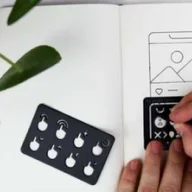
Uicard is a compact wireframing tool designed for quick sketching of user interfaces. It functions as a physical ruler in the form of a pocket-friendly deck, enabling designers to create low-fidelity wireframes offline without digital software. As a UX tool in the category of ux-tools, Uicard supports early-stage ideation in the design workflow, from initial concepts to layout exploration. It operates on a paid pricing model, available through platforms like Kickstarter.
What Uicard Does
- Provides pre-printed UI cards representing common elements such as buttons, navigation bars, images, and text blocks for assembling screens.
- Allows stacking and arranging cards to build screen layouts, simulating mobile or web interfaces rapidly.
- Includes navigation cards to map out information architecture and user flows by organizing cards hierarchically.
- Supports photography of assembled card stacks to capture and share wireframe designs via smartphone snapshots.
- Offers blank cards as placeholders for custom elements not covered in the standard deck.
- Facilitates portable sketching sessions outside of computer-based environments.
How Uicard Can Be Used
- Designers select UI cards and navigation cards to sketch mobile app screens, photographing the stack to document layouts for team reviews.
- Product teams arrange cards on a table to ideate service flows, using hierarchy to define navigation paths before digital prototyping.
- Freelancers carry Uicard in a pocket for on-the-go brainstorming during client meetings, snapping photos to iterate ideas immediately.
- Collaborative workshops involve multiple participants pulling cards to build competing wireframes side-by-side, comparing structures visually.
- Transition from physical sketches to digital tools by referencing photos of Uicard assemblies as references in software like Figma or Sketch.
Who Is Uicard For?
Uicard serves UX designers, product managers, and developers seeking fast, tactile wireframing methods for mobile and web projects. It fits solo practitioners or small teams handling early ideation phases, especially those preferring analog tools to avoid screen fatigue or software setup. Experience levels range from juniors learning layout basics to seniors facilitating workshops. Project types include app prototyping, service design, and MVP planning where speed trumps pixel-perfect fidelity. Visit Uicard
Featured Tools
Sponsored
Artlist
Royalty-free music, SFX, 8K footage, templates, LUTs and 100+ AI models on a single subscription for video creators.

Icons8
Large icon packs featuring over 10,000 icons for consistent design themes.

Vidu
AI video generator with text, image and reference-to-video modes, producing 3–16 second clips at up to 1080p with characters that stay consistent across shots.
Your tool here
The tools above are our own picks until the slots sell.
Spotlight
SponsoredRotates daily
FontLab
Integrated font editor for creating fonts across various applications.
Tools we recommend


Editorially chosen. Some links above are affiliate links — if you sign up we may earn a commission, at no extra cost to you.
More UX Tools Tools


Slicer.dev
Slicer audits entire websites and user flows, giving teams a structured way to review UI/UX at scale — then extracts any component it finds into ready-to-use AI prompts or React code.


2020 Ipsum
A Lorem Ipsum generator themed on unforgettable 2020 events.


Aaply
Wireframe mobile apps and create user-centered product experiences.


Avvvatars
Unique placeholder avatars tailored to your users.


Axure
Plan, wireframe, and prototype without any coding required.


Ballpark
Quick asynchronous product research for prototypes and designs.
Explore Other Categories
Discover more design resources
New to Design?
Explore our comprehensive design glossary to master essential terminology from A/B Testing to Wireframes.
Browse GlossaryLooking for something specific?
Search through our entire collection of design tools and resources