
Corner Shaper is a FREE visual editor for styling div container corners using modern CSS clip-path features.
What it costs
- Free tier
- Yes
Free with no account, no signup and no paid tier — every corner style and all three exports (CSS, SVG, Copy to Figma) are available immediately, and shapes are generated in the browser rather than uploaded. The real limit is browser support, not price: the generated clip-path: shape() rules need Chrome 135+, Safari 18.4+ or Firefox 148+, and the SVG export is the documented fallback for anything older.
Prices checked on 2 September 2026Source

About Corner Shaper
Corner Shaper: A Free Visual Editor for CSS clip-path Corner Shapes
Corner Shaper is a browser-based editor for shaping the corners of a div. Rounded corners are the one treatment every visual builder ships natively; anything past that — a concave notch, a stepped chamfer, a folded flap — normally means hand-written CSS or nested wrappers. Corner Shaper produces all of it with modern CSS clip-path on a single element: toggle the corners you want, pick a style, drag a few sliders, copy the rule. It was written for Breakdance, Elementor, Bricks, Oxygen and Webflow users, whose container settings stop at a border-radius field, but the output is plain CSS and works anywhere.
Key Features
- Eight corner styles — Round, Squircle, Blob, Inverted, Steps, Zigzag, Bevel and Folded, each with its own controls rather than one generic radius.
- Per-corner control — Each of the four corners is configured independently, or a Sync All toggle applies one set of settings to all of them.
- Live preview — Shape and generated CSS update together as you drag, so you read the real rule, not a picture of it.
- Free, with no account — A static page that runs entirely in the browser: nothing to sign up for, nothing uploaded, no watermark, no paid tier.
- Three export paths — Copy the CSS, download a standalone SVG, or copy markup that pastes into Figma as vector paths.
The Eight Corner Styles
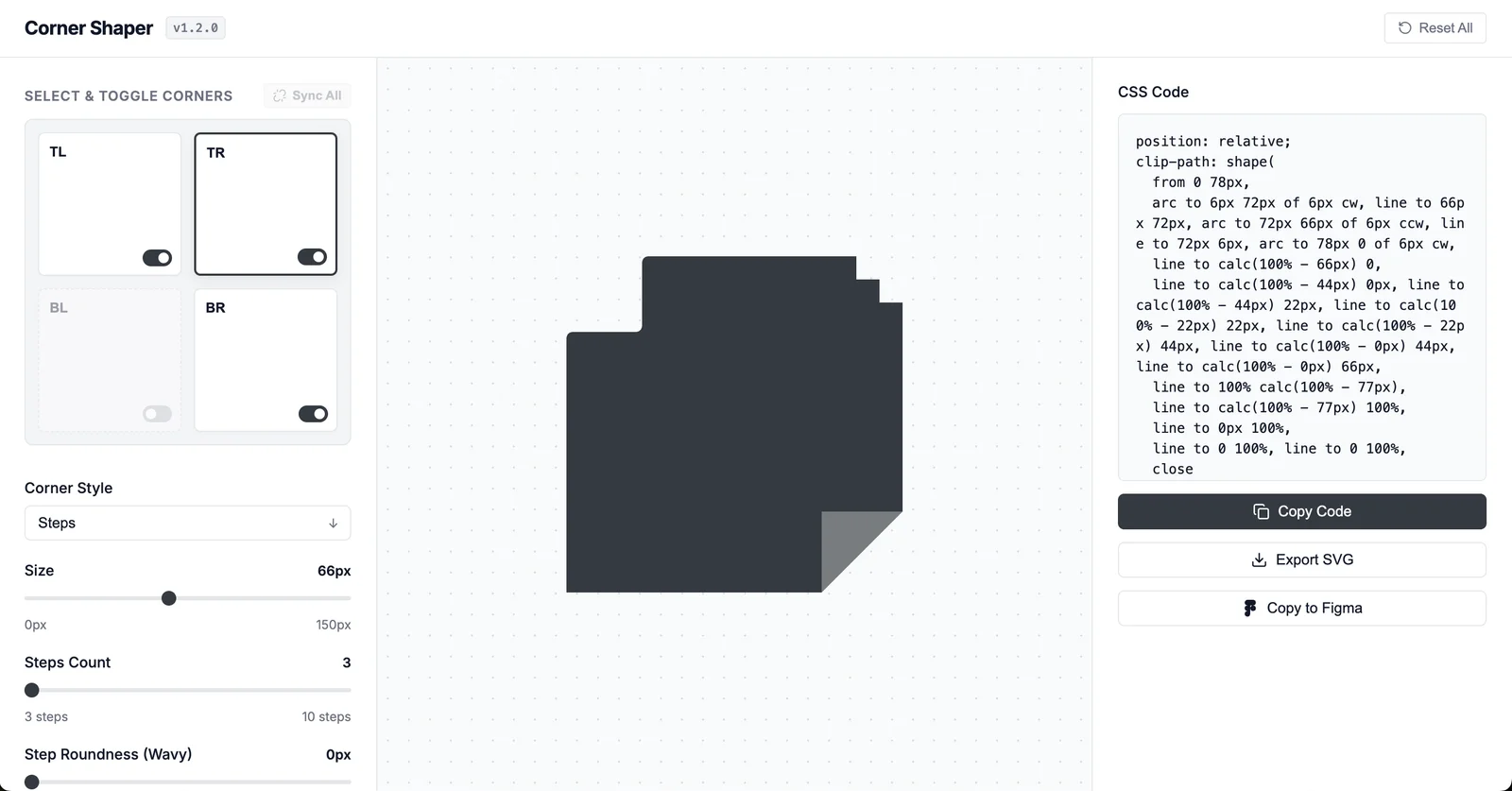
Round is a plain circular arc, sized in pixels up to 150px, as is every style here. Squircle approximates a superellipse with cubic beziers — the continuous corner a border-radius cannot produce. Blob generates organic lobes with a bulge from 0 to 100%, one to four lobes, and a shuffle that reseeds it. Inverted cuts a concave notch inward, its three radii unlinkable for an asymmetric transition. Steps builds a chamfer of three to ten steps, with optional roundness up to 25px for a wavy staircase. Zigzag serrates across two to twenty segments with adjustable amplitude and its own reseed. Bevel is a diagonal chamfer whose width and height unlink for an off-angle cut. Folded is the outlier: as well as clipping, it emits a positioned pseudo-element with a drop shadow to fake a turned-over paper corner.
What It Outputs
The CSS panel emits a clip-path: shape() declaration built from line and arc commands with calc() offsets, which is what keeps it responsive — corners stay fixed in pixels while the edges track the box. Folded arrives as a short block instead: position: relative, the clip-path, and a nested ::before carrying a polygon() clip and a drop-shadow filter.
How to Use Corner Shaper
- Toggle on the corners you want to shape, or hit Sync All to treat them as one.
- Pick a style, then set the size and any style-specific controls.
- Copy the CSS, export the SVG, or copy the shape to Figma.
- Paste the CSS into your builder's custom CSS field; backgrounds, padding, typography and borders stay on the builder's own settings.
Browser Support and the SVG Fallback
The rules use CSS shape() from CSS Shapes Level 2, now shipped in all three major engines — Chrome 135, Safari 18.4 and Firefox 148 — so current browsers render it natively. Older ones will not, and neither will Firefox ESR 140, still the build on many managed desktops. The SVG export is the documented way around that — use the file as an image or mask. Folded's pseudo-element is a separate matter, needing only absolute positioning, polygon() clipping and drop-shadow.
Who It's For
- Page-builder users in Breakdance, Elementor, Bricks, Oxygen or Webflow who need a corner the builder cannot make
- Front-end developers who want a working clip-path: shape() rule instead of hand-plotting beziers
- Designers who want the shape as an SVG or a Figma vector path
- Anyone building feature cards or banners that need a distinctive edge
Conclusion
Corner Shaper is narrow on purpose, and that is the point: it does the one thing visual builders leave undone, and hands back real code, not a screenshot. It is free outright — no account, no watermark, no paid plan — so the only real constraint is browser support, which the SVG export covers.
Featured Tools
Sponsored
Artlist
Royalty-free music, SFX, 8K footage, templates, LUTs and 100+ AI models on a single subscription for video creators.

Icons8
Large icon packs featuring over 10,000 icons for consistent design themes.

Vidu
AI video generator with text, image and reference-to-video modes, producing 3–16 second clips at up to 1080p with characters that stay consistent across shots.
Your tool here
The tools above are our own picks until the slots sell.
Spotlight
SponsoredRotates daily
Hailuo AI
AI video generator from MiniMax with cinematic, language-driven camera control.
Tools we recommend


getimg.ai
20+ AI models for image, video & audio in one workspace


OpenArt
All-in-one AI image, video & audio generator


YouCam Online Editor
Free online AI photo & video editor
Editorially chosen. Some links above are affiliate links — if you sign up we may earn a commission, at no extra cost to you.
More Design Tools Tools


Pryzm
Pryzm is a real-time studio for designers who need backgrounds that don't look like everyone else's. Layer procedural gradients, then stack glass, grain, light and blobs.


Modeinspect
Mode turns your product’s codebase into editable canvas frames. Refine real UI with visual controls, experiment with AI then share or hand off for review.


GoProd
Remove backgrounds and upscale images effectively.


Kittl
AI-first design platform with image, vector, and video generation, plus templates, mockups, and print-ready exports.


Lunacy
Free design software enhanced with AI tools and built-in graphics.


Smart Upscaler
Automatically improve image clarity using AI technology.
Explore Other Categories
Discover more design resources
New to Design?
Explore our comprehensive design glossary to master essential terminology from A/B Testing to Wireframes.
Browse GlossaryLooking for something specific?
Search through our entire collection of design tools and resources