

AI-first design platform with image, vector, and video generation, plus templates, mockups, and print-ready exports.
What it costs
- Free tier
- Yes
- Paid plans from
- $10/mo (billed annually) or $15/mo monthly
Genuine free plan offers basic tools, templates and 20 AI credits but is personal-use only with attribution and limited exports; the Pro tier adds commercial rights and higher limits.
Auto-checked on 10 August 2026Source
About Kittl
Kittl: AI-First Design Platform for Graphics, Merch, and Print
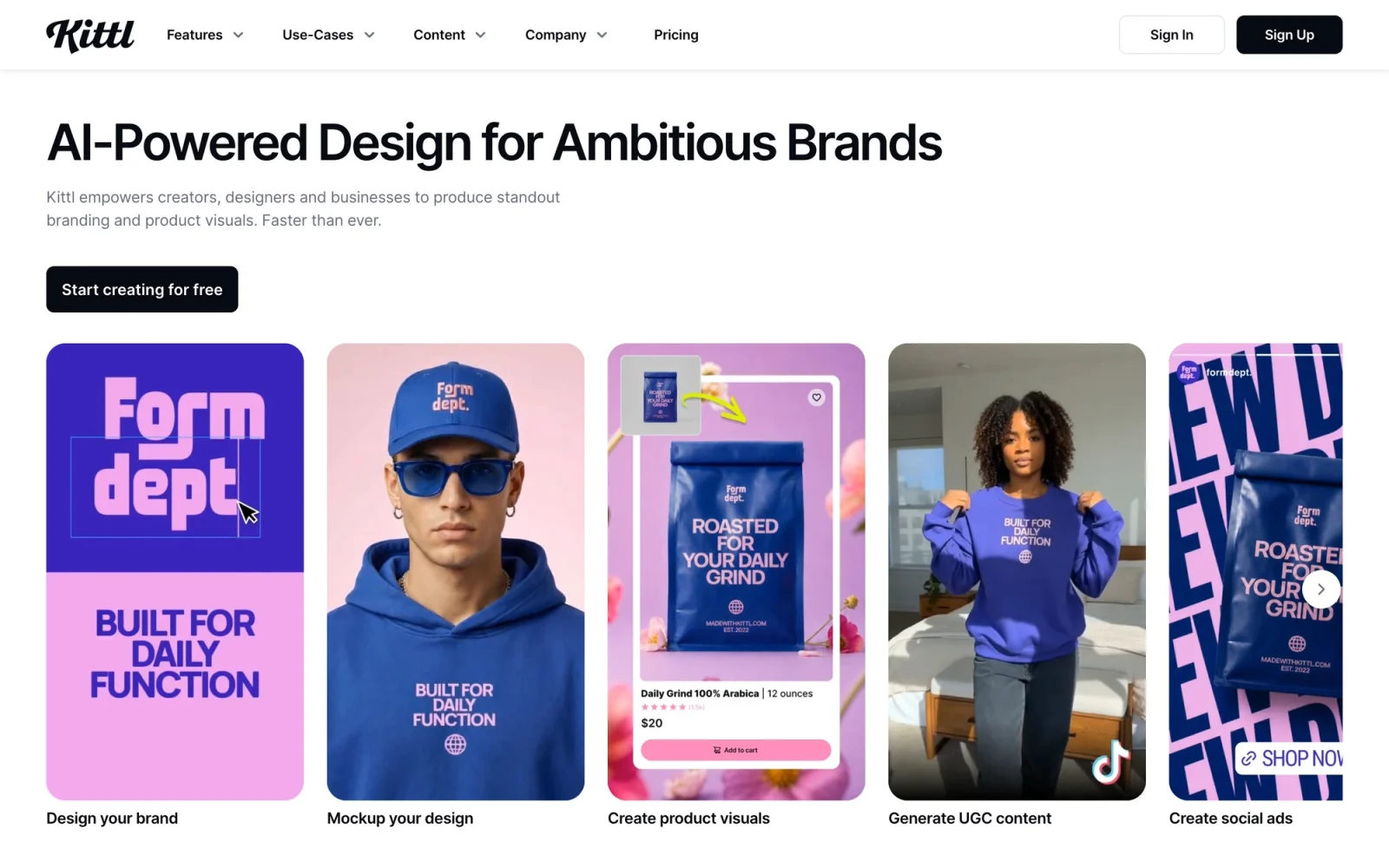
Kittl is an AI-first, browser-based design platform that pairs a full graphic-design editor with an AI creative suite — image, vector, and video generation — plus templates, mockups, and a premium font library. Rather than being just a template tool, it's built to take you from a prompt or an idea all the way to a print-ready, commercially usable design, which makes it especially popular with print-on-demand sellers, merch designers, and brands. Everything runs in the browser, so there's nothing to install.
Key Features
- AI Image Generator — Turn text prompts into polished images.
- AI Vector Generator — Generate clean, editable vector artwork from a prompt — a standout for logos, merch, and print.
- AI Video Generator — Create and animate short videos with AI.
- Background Remover, Image Upscaler, and Vectorizer — Cut out backgrounds in seconds, turn low-res images into high-definition assets, and convert any image into scalable vector paths.
- Full design editor — An infinite canvas with vector editing, instant Text Effects (arch, wave, distort, and more), and real-time collaboration.
- Templates, Mockups, and Fonts — Branding, print, and digital templates, realistic product mockups, and a premium font library via a Monotype partnership.
- Content Library — Over 10,000 curated in-house illustrations and graphics.
How Kittl Works
You can start from a template, a blank canvas, or an AI prompt. The AI tools sit directly inside the editor, so you can generate an image or an editable vector, remove a background or upscale it, and drop the result straight into your design without switching tools. Under the hood, Kittl routes multiple leading AI models — including those from ByteDance, Ideogram, Google, OpenAI, and Black Forest Labs — through a single interface, so you can pick the right engine for the job. Real-time collaboration lets teams work on the same canvas together.
Print-Ready Output and Formats
Kittl exports to PNG, JPEG, PDF, and SVG, with editable vector paths preserved in SVG (vector export is a paid-plan feature). You can set dimensions in pixels, inches, or millimeters and control DPI, with print-ready 300 DPI output — for example, a transparent-background PNG sized for a t-shirt front. That print focus extends to platform compatibility: Kittl is designed so your files pass the quality checks on Etsy, Shopify, Printify, and Printful, making it a natural fit for anyone selling physical products.
Pricing
Kittl offers a free plan with access to the editor and curated templates, though the free tier is for personal use only, without commercial rights. Paid subscriptions — Pro (from around $10/month billed annually) and Expert (from around $24/month) — add commercial licensing so you can sell what you create, along with higher limits and vector export. Team and business plans with extended licensing are also available, and the generative AI tools run on an AI-credit system on top of the subscription.
Who It's For
- Print-on-demand sellers publishing merch and designs at volume
- T-shirt and merchandise designers who need editable, print-ready vector art
- Brands and businesses creating branding, logos, and marketing visuals
- Social-media content creators and individual designers who want AI generation and a design editor in one place
Conclusion
Kittl brings AI generation — image, vector, and video — into a genuine design editor, alongside the templates, mockups, fonts, and print-ready exports needed to go from idea to finished product. Its editable text-to-vector AI and deep print-on-demand support make it a particularly strong choice for anyone designing and selling merch, while remaining a versatile all-in-one design tool for creators and brands.
Featured Tools
Sponsored
Artlist
Royalty-free music, SFX, 8K footage, templates, LUTs and 100+ AI models on a single subscription for video creators.

Icons8
Large icon packs featuring over 10,000 icons for consistent design themes.

Vidu
AI video generator with text, image and reference-to-video modes, producing 3–16 second clips at up to 1080p with characters that stay consistent across shots.
Your tool here
The tools above are our own picks until the slots sell.
Spotlight
SponsoredRotates daily
Animated Icons 2.0
Enhance your projects with 900+ animated icons.
Tools we recommend


getimg.ai
20+ AI models for image, video & audio in one workspace


OpenArt
All-in-one AI image, video & audio generator


YouCam Online Editor
Free online AI photo & video editor
Editorially chosen. Some links above are affiliate links — if you sign up we may earn a commission, at no extra cost to you.
More Design Tools Tools


Pryzm
Pryzm is a real-time studio for designers who need backgrounds that don't look like everyone else's. Layer procedural gradients, then stack glass, grain, light and blobs.


Modeinspect
Mode turns your product’s codebase into editable canvas frames. Refine real UI with visual controls, experiment with AI then share or hand off for review.


GoProd
Remove backgrounds and upscale images effectively.


Lunacy
Free design software enhanced with AI tools and built-in graphics.


Smart Upscaler
Automatically improve image clarity using AI technology.
PhotoFresco
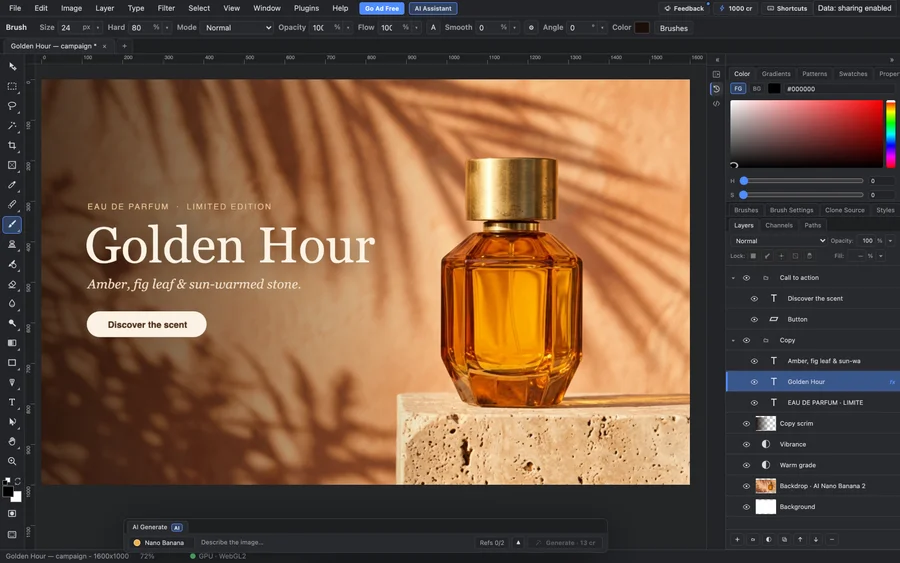
A free, Photoshop-style image editor in your browser, built for humans and AI agents. Edit with real layers, masks, selections and brushes, and open and save PSD files, with no install or account.
Explore Other Categories
Discover more design resources
New to Design?
Explore our comprehensive design glossary to master essential terminology from A/B Testing to Wireframes.
Browse GlossaryLooking for something specific?
Search through our entire collection of design tools and resources