
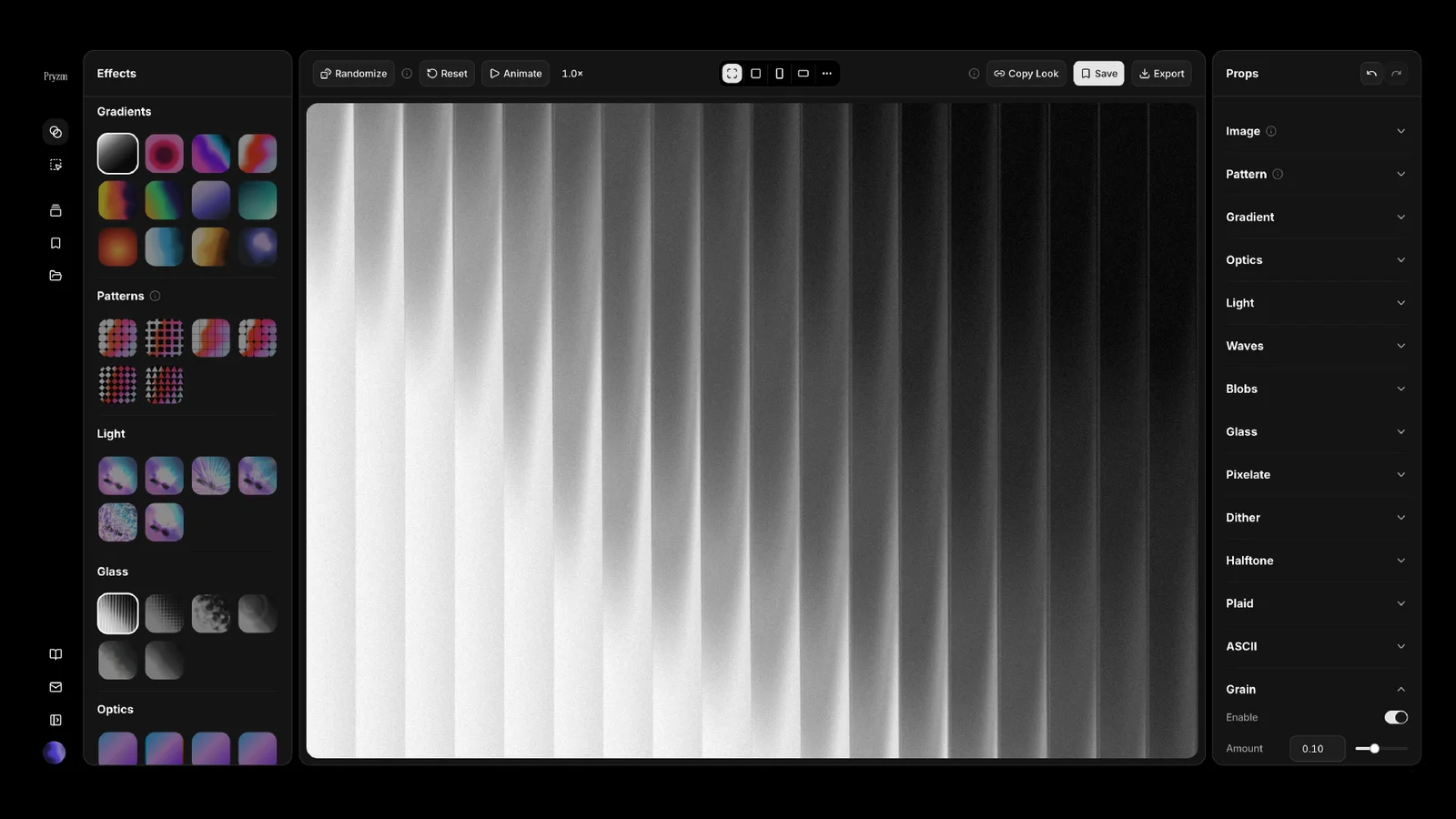
Pryzm is a real-time studio for designers who need backgrounds that don't look like everyone else's. Layer procedural gradients, then stack glass, grain, light and blobs.
What it costs
- Free tier
- Yes
- Paid plans from
- $6.75/mo
The full studio and every effect are free, but free export caps at 720p and watermarks video; Pryzm Pro ($6.75/mo billed yearly at $81, or monthly) removes the watermark and unlocks HD–4K, longer loops and unlimited saved looks.
Auto-checked on 8 August 2026Source
About Pryzm
Pryzm: Original Animated Backgrounds and Gradient Loops, Made in Your Browser
Pryzm is a browser-based background maker and visual studio for designers who need backgrounds that don't look like everyone else's. Instead of dropping in the same stock gradient or royalty-free texture, you build your own look by layering procedural gradients with glass, grain, light, and blob effects — then export it as a still image or a seamless animated loop. Everything renders in real time on WebGL, so you adjust a control and see the result instantly, with no installation, no plugins, and no rendering queue to wait on.
Key Features
- Real-time layered editor — Start from a procedural gradient, add an optional photo, then stack effects like frosted and ribbed glass, film grain, chromatic aberration, light, and blobs, adjusting each one live.
- Flow node graph — Prefer to work structurally? Flow shows the same background as a node graph you can rewire, giving you precise control over how every effect connects.
- Inspiration gallery — Open any finished look from the gallery as an editable starting point, so you never have to begin from a blank canvas.
- Animated loop export — Export seamless animated backgrounds as MP4 (H.264), WebM (VP9), or AV1, alongside high-resolution PNG stills.
- Shareable looks — Every design has a share link that reproduces it exactly for anyone who opens it.
- Private and installation-free — Rendering happens entirely on your device; nothing is uploaded while you design, and it runs in any modern browser.
How Pryzm Works
Pryzm is built around layering. You begin with a gradient background and build up from there, stacking effects until the composition feels right. Because the studio uses WebGL to render on your own hardware, every gradient tweak, grain adjustment, or glass distortion updates immediately — there's no waiting for a preview to catch up. If you think in terms of connections rather than layers, the Flow view exposes the same look as an editable node graph, letting you wire effects together and reroute them without ever losing your place in the design.
Backgrounds and Effects You Can Create
Pryzm is designed for the kinds of backgrounds modern interfaces rely on — website hero sections, presentation slides, social graphics, app screens, and template artwork. The effect stack gives each one a distinctive finish:
- Procedural gradients — Smooth, original color blends that form the base of every look.
- Glass effects — Frosted and ribbed glass for depth, refraction, and a premium, layered feel.
- Grain and texture — Film grain and chromatic aberration that add character and avoid a flat, generic look.
- Light and blobs — Soft light and organic blob shapes for movement, depth, and focus.
Export Formats and Sharing
Anything you make in Pryzm exports as a high-resolution PNG or as a seamless animated loop in MP4, WebM, or AV1 — ready to drop straight into a site, deck, or video edit. The studio is free to explore without an account, and a free account covers PNG and video export up to 720p. Pryzm Pro unlocks HD through 4K exports, removes the video watermark, and adds longer loops and higher frame rates. Whatever you export is yours to use in both personal and commercial projects.
How to Create a Background with Pryzm
- Open the studio in your browser, or pick a look from the inspiration gallery to start from.
- Choose a gradient base and layer on glass, grain, light, and other effects.
- Fine-tune each effect in real time, or switch to Flow to rewire the node graph.
- Export your design as a PNG still or a seamless MP4, WebM, or AV1 loop.
Who It's For
- Web and product designers building distinctive hero and section backgrounds
- Presentation and content creators who need original slide and social backgrounds
- Template and theme designers who want backgrounds nobody else is shipping
- Motion and video creators looking for quick, seamless animated loops
- Anyone who wants a unique background in seconds without installing software
Conclusion
Pryzm turns background creation into a fast, visual, and private process: layer procedural gradients with glass, grain, and light, watch every change render live, and export a still or a seamless animated loop in seconds. For designers tired of recognizable stock gradients, it's a simple way to ship backgrounds that are genuinely their own.
Featured Tools
Sponsored
Artlist
Royalty-free music, SFX, 8K footage, templates, LUTs and 100+ AI models on a single subscription for video creators.

Icons8
Large icon packs featuring over 10,000 icons for consistent design themes.

Vidu
AI video generator with text, image and reference-to-video modes, producing 3–16 second clips at up to 1080p with characters that stay consistent across shots.
Your tool here
The tools above are our own picks until the slots sell.
Spotlight
SponsoredRotates daily
HyNote
Records and transcribes interviews and meetings, then turns them into summaries and action items.
Tools we recommend


getimg.ai
20+ AI models for image, video & audio in one workspace


OpenArt
All-in-one AI image, video & audio generator


YouCam Online Editor
Free online AI photo & video editor
Editorially chosen. Some links above are affiliate links — if you sign up we may earn a commission, at no extra cost to you.
More Design Tools Tools


Modeinspect
Mode turns your product’s codebase into editable canvas frames. Refine real UI with visual controls, experiment with AI then share or hand off for review.


GoProd
Remove backgrounds and upscale images effectively.


Kittl
AI-first design platform with image, vector, and video generation, plus templates, mockups, and print-ready exports.


Lunacy
Free design software enhanced with AI tools and built-in graphics.


Smart Upscaler
Automatically improve image clarity using AI technology.
PhotoFresco
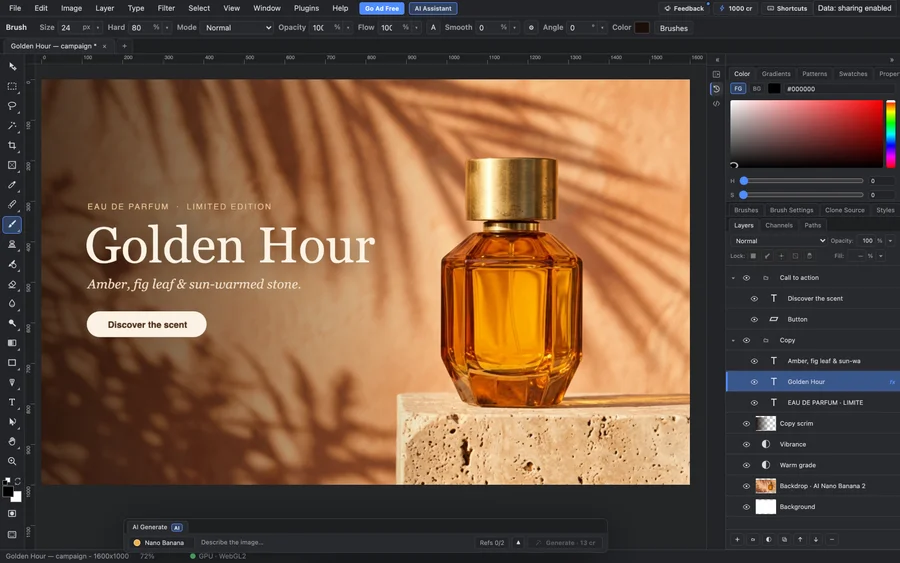
A free, Photoshop-style image editor in your browser, built for humans and AI agents. Edit with real layers, masks, selections and brushes, and open and save PSD files, with no install or account.
Explore Other Categories
Discover more design resources
New to Design?
Explore our comprehensive design glossary to master essential terminology from A/B Testing to Wireframes.
Browse GlossaryLooking for something specific?
Search through our entire collection of design tools and resources