
What it costs
- Free tier
- Yes
Free open-source easing-functions cheat sheet with no paid plan.
Auto-checked on 8 August 2026Source
About Easings
What Is Easings?
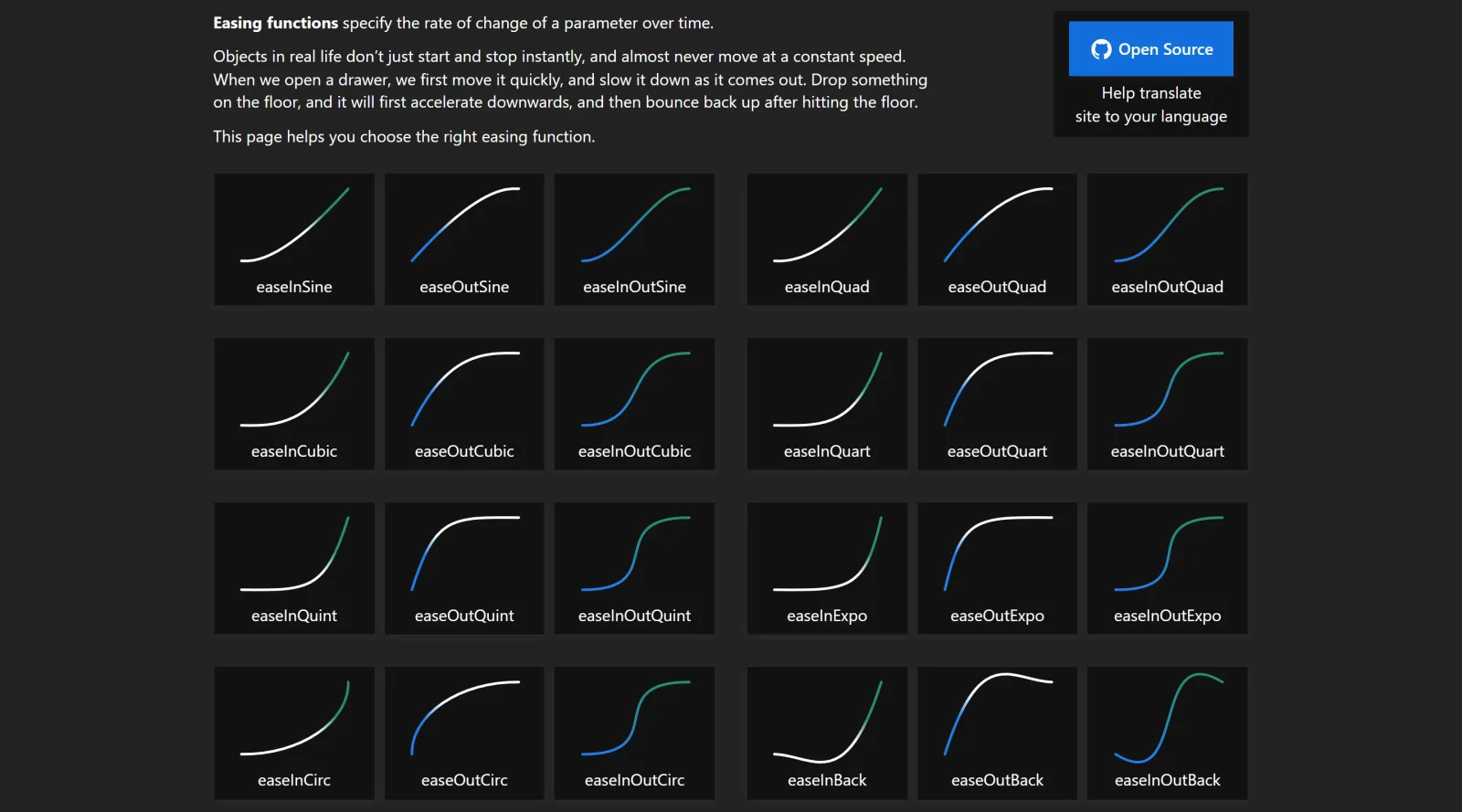
Easings is a free online cheat sheet and reference tool in the Design category that provides visual examples of easing functions for web animations. It demonstrates how different easing curves control the rate of change over time in CSS transitions and keyframe animations, helping designers and developers select appropriate functions for realistic motion effects. Easings fits into the front-end design workflow during the prototyping and refinement stages, where smooth animations enhance user interfaces without constant-speed movement that feels unnatural.
What Easings Does
- Displays visual graphs of common easing functions like ease-in, ease-out, ease-in-out, and cubic-bezier curves to show acceleration and deceleration patterns.
- Provides ready-to-copy CSS code snippets for transitions and @keyframes using selected easing functions.
- Offers interactive previews of easing effects applied to animated blocks, mimicking real-world object motion such as drawers opening or objects falling.
- Lists predefined easing options including linear, bounce, elastic, and back variations for quick reference.
- Supports testing easing on properties like transform and background gradients to visualize changes over a 0.6-second duration.
- Generates JavaScript function representations of easing curves for custom implementations.
How Easings Can Be Used
- Designers reference Easings during UI animation planning to choose curves that make button hovers or menu expansions feel responsive, such as using ease-out for quick starts and smooth stops.
- Developers copy CSS transition code directly into stylesheets for elements like sliding panels or fading modals in web projects.
- Teams prototype interactions in tools like Webflow by matching visual previews from Easings to built-in easing options for consistent motion.
- Front-end coders experiment with cubic-bezier values on the site to create custom timings for scroll-triggered animations or loading states.
- Animators compare linear versus non-linear easings to avoid abrupt starts and stops, applying selected curves to keyframe sequences for natural flow.
Who Is Easings For?
Easings serves web designers, front-end developers, and UI/UX professionals who work with CSS animations and need a quick visual reference for timing functions. It suits beginners learning animation basics as well as experienced users refining motion design in projects involving interactive elements, prototypes, or responsive sites. Motion designers in game UI or app development also use it to test easing for elements like buttons or notifications. Visit Easings
Featured Tools
Sponsored
Artlist
Royalty-free music, SFX, 8K footage, templates, LUTs and 100+ AI models on a single subscription for video creators.

Icons8
Large icon packs featuring over 10,000 icons for consistent design themes.

Vidu
AI video generator with text, image and reference-to-video modes, producing 3–16 second clips at up to 1080p with characters that stay consistent across shots.
Your tool here
The tools above are our own picks until the slots sell.
Spotlight
SponsoredRotates daily
HyNote
Records and transcribes interviews and meetings, then turns them into summaries and action items.
Tools we recommend


getimg.ai
20+ AI models for image, video & audio in one workspace


OpenArt
All-in-one AI image, video & audio generator


YouCam Online Editor
Free online AI photo & video editor
Editorially chosen. Some links above are affiliate links — if you sign up we may earn a commission, at no extra cost to you.
More Design Tools Tools


Pryzm
Pryzm is a real-time studio for designers who need backgrounds that don't look like everyone else's. Layer procedural gradients, then stack glass, grain, light and blobs.


Modeinspect
Mode turns your product’s codebase into editable canvas frames. Refine real UI with visual controls, experiment with AI then share or hand off for review.


GoProd
Remove backgrounds and upscale images effectively.


Kittl
AI-first design platform with image, vector, and video generation, plus templates, mockups, and print-ready exports.


Lunacy
Free design software enhanced with AI tools and built-in graphics.


Smart Upscaler
Automatically improve image clarity using AI technology.
Explore Other Categories
Discover more design resources
New to Design?
Explore our comprehensive design glossary to master essential terminology from A/B Testing to Wireframes.
Browse GlossaryLooking for something specific?
Search through our entire collection of design tools and resources