
A free, Photoshop-style image editor in your browser, built for humans and AI agents. Edit with real layers, masks, selections and brushes, and open and save PSD files, with no install or account.
What it costs
- Free tier
- Yes
- Paid plans from
- $8/mo
The full editor and local files are free forever, funded by ads in the editor. Ad-free is $8/month and adds cloud drive — auto-renews monthly, cancel in one click, effective at the end of the paid period. AI generation is NOT included in that: credits are one-time packs from $9 for 500 credits, with no free allowance, so the two paid things are separate. If a paid plan ends, cloud documents stay read-only and downloadable.
Auto-checked on 18 October 2026Source
About PhotoFresco
PhotoFresco: A Real Photoshop-Style Editor That Runs in a Browser Tab
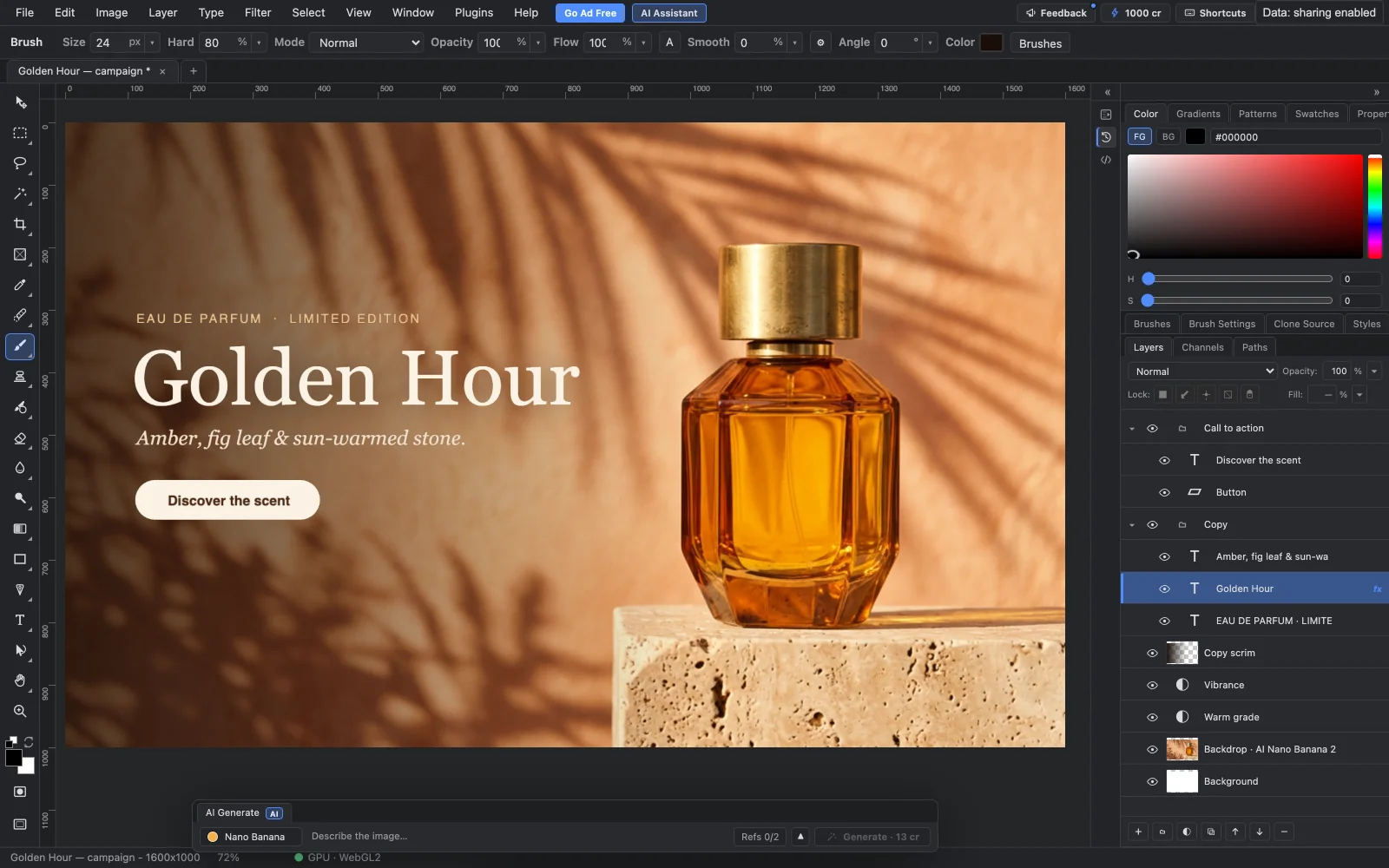
PhotoFresco is a free raster image editor that opens in a browser with no install, no account and no download. It is not a filter toy with a layers panel bolted on: it has groups, blend modes, masks, marquee and lasso selections, a magic wand, brushes, adjustment and text layers, free transform and 64 steps of undo, and it opens and saves PSD files losslessly. Editing runs on your own machine on the GPU. It also has two things a desktop editor does not — AI generation that lands as an editable layer, and an MCP connector that lets a coding agent drive the editor while you watch.
Key Features
- PSD in, PSD out — Open an existing layered file, work on it, and save back losslessly.
- A full raster toolbox — Layers with groups, blend modes, opacity and fill, masks, selections, brushes, filters and free transform.
- GPU-accelerated — WebGL2 with tiled rendering and a GPU compositor, so 4K documents stay responsive.
- AI generation as layers — Prompt a model and the result arrives as an editable layer you can mask and paint over, never a flat download.
- Agent-drivable — An MIT-licensed local connector exposes each editor operation as an MCP tool for Claude Code, Codex or Gemini CLI.
- Works offline — Once the editor has loaded, it keeps working without a connection.
How It Holds Up as an Editor
The claim worth testing on any browser editor is whether it collapses on a real file, and PhotoFresco is built for that case rather than around it. It advertises opening a fifty-layer PSD and getting to work, keeps blend math aligned with Photoshop's 8-bit sRGB semantics, and leans on tiled rendering plus a GPU compositor so large canvases stay fluid. The panels are the ones you already know — layer groups, blend mode, opacity and fill, adjustment layers, layer styles — rather than a simplified reinterpretation. Lossless PSD round-tripping is the detail that matters most in practice, because it is usually what forces people back to the desktop application halfway through a job.
AI That Behaves Like a Layer
Generation is built into the canvas rather than bolted on beside it. You type a prompt, pick from Nano Banana, Nano Banana 2 or Nano Banana Pro with the credit cost shown before you spend it, and the result drops in as a new layer — maskable, blendable, paintable and undoable like anything else in the document. You can run the same prompt through different models and keep the take you prefer, or batch generate when one option is not enough. There is also a separate Model Lab for comparing models outside a document. Credits are a one-time purchase rather than a subscription, and there is no free allowance, so AI is strictly opt-in.
The Agent Integration Is the Interesting Part
Every editing action in PhotoFresco is a structured operation, which means an AI agent can call the same commands the buttons do. In practice that works through a small open-source local connector, MIT-licensed and published on GitHub, which opens a PhotoFresco window and relays requests from an agent — reached either through an MCP server exposing one tool per editor operation, or through a photofresco command line. It works with Claude Code, Codex, Gemini CLI or any client that can start an MCP server over stdio. The guardrails are sensible: nothing connects until you check a connection code and click Allow, a new agent session starts with no permissions at all, you choose what it may do, and you can pause or stop it mid-flow. Every edit the agent makes appears in the History panel and can be undone exactly like your own. It needs Node.js 22 or newer and a Chromium browser, and for the moment it installs from GitHub rather than npm.
Worth Knowing About Session Recording
PhotoFresco records your editing sessions, and this is worth understanding before you open client work in it. Recording and diagnostics run on every editor page, start as soon as the editor loads, and there is no in-editor switch to turn them off. The recordings capture clicks, pointer movement, keyboard input, tool choices, editing commands and file names — and, importantly, they can include copies of the images you open, up to six files per session at up to 16 MiB each, which PhotoFresco can replay as video and view. Password and email fields are masked; other typed content is not. The company's own guidance is direct about the implication: do not open confidential or sensitive images while recording is on. There is one exception, and it is a useful one — a window opened by the agent connector does not record at all, so the agent route is also the private route. Credit where it is due: all of this is spelled out plainly in a linked privacy document rather than buried in a policy, which is more transparency than most free tools offer.
How to Use PhotoFresco
- Open the editor in a browser — no account, no install, no card.
- Drag in a PSD or start a new document and work with the layer and brush panels as usual.
- Use AI generation if you want it, checking the credit cost before you spend.
- Save back to PSD, or export to your device.
- To drive it from Claude Code or another agent, install the connector from GitHub and approve the connection code.
Who It's For
- Designers who need real layer and mask editing on a machine without Photoshop installed
- Anyone who has to open or fix a PSD occasionally and cannot justify a subscription for it
- People working on Chromebooks, locked-down work laptops or borrowed machines
- Developers who want an agent to assemble layered artwork step by step and hand it back
- Anyone who wants AI generation that arrives as an editable layer rather than a flat export
Conclusion
PhotoFresco is a genuinely capable browser editor rather than a demo — the PSD round-tripping, the GPU compositor and the full layer stack put it in the same conversation as desktop software, and the agent connector is one of the more thoughtful applications of MCP in a design tool. The free tier carries ads, AI credits are a separate one-time spend, and the session recording deserves a read before you open anything confidential. Keep client-sensitive material out of it unless you are driving it through the connector, and it is one of the most useful free design tools you can open in a tab.
Featured Tools
Sponsored
Artlist
Royalty-free music, SFX, 8K footage, templates, LUTs and 100+ AI models on a single subscription for video creators.

Icons8
Large icon packs featuring over 10,000 icons for consistent design themes.

Vidu
AI video generator with text, image and reference-to-video modes, producing 3–16 second clips at up to 1080p with characters that stay consistent across shots.
Your tool here
The tools above are our own picks until the slots sell.
Spotlight
SponsoredRotates daily
Hailuo AI
AI video generator from MiniMax with cinematic, language-driven camera control.
Tools we recommend


getimg.ai
20+ AI models for image, video & audio in one workspace


OpenArt
All-in-one AI image, video & audio generator


YouCam Online Editor
Free online AI photo & video editor
Editorially chosen. Some links above are affiliate links — if you sign up we may earn a commission, at no extra cost to you.
More Design Tools Tools


Pryzm
Pryzm is a real-time studio for designers who need backgrounds that don't look like everyone else's. Layer procedural gradients, then stack glass, grain, light and blobs.


Modeinspect
Mode turns your product’s codebase into editable canvas frames. Refine real UI with visual controls, experiment with AI then share or hand off for review.


GoProd
Remove backgrounds and upscale images effectively.


Kittl
AI-first design platform with image, vector, and video generation, plus templates, mockups, and print-ready exports.


Lunacy
Free design software enhanced with AI tools and built-in graphics.


Smart Upscaler
Automatically improve image clarity using AI technology.
Explore Other Categories
Discover more design resources
New to Design?
Explore our comprehensive design glossary to master essential terminology from A/B Testing to Wireframes.
Browse GlossaryLooking for something specific?
Search through our entire collection of design tools and resources