

Make a photo collage in your browser: drop photos in, pick one of 140+ layouts and frames or build your own, then download it. Free, no account, no watermark - your photos never leave your device.
What it costs
- Free tier
- Yes
Free throughout — there is no paid tier, no sign-up, no watermark and no export cap, and every template, frame and print size is included. The cookie notice asks consent for analytics and advertising, and saved templates live in your browser's storage rather than an account.
Auto-checked on 13 August 2026Source
About MyCollages
MyCollages: A Free Online Collage Maker That Never Uploads Your Photos
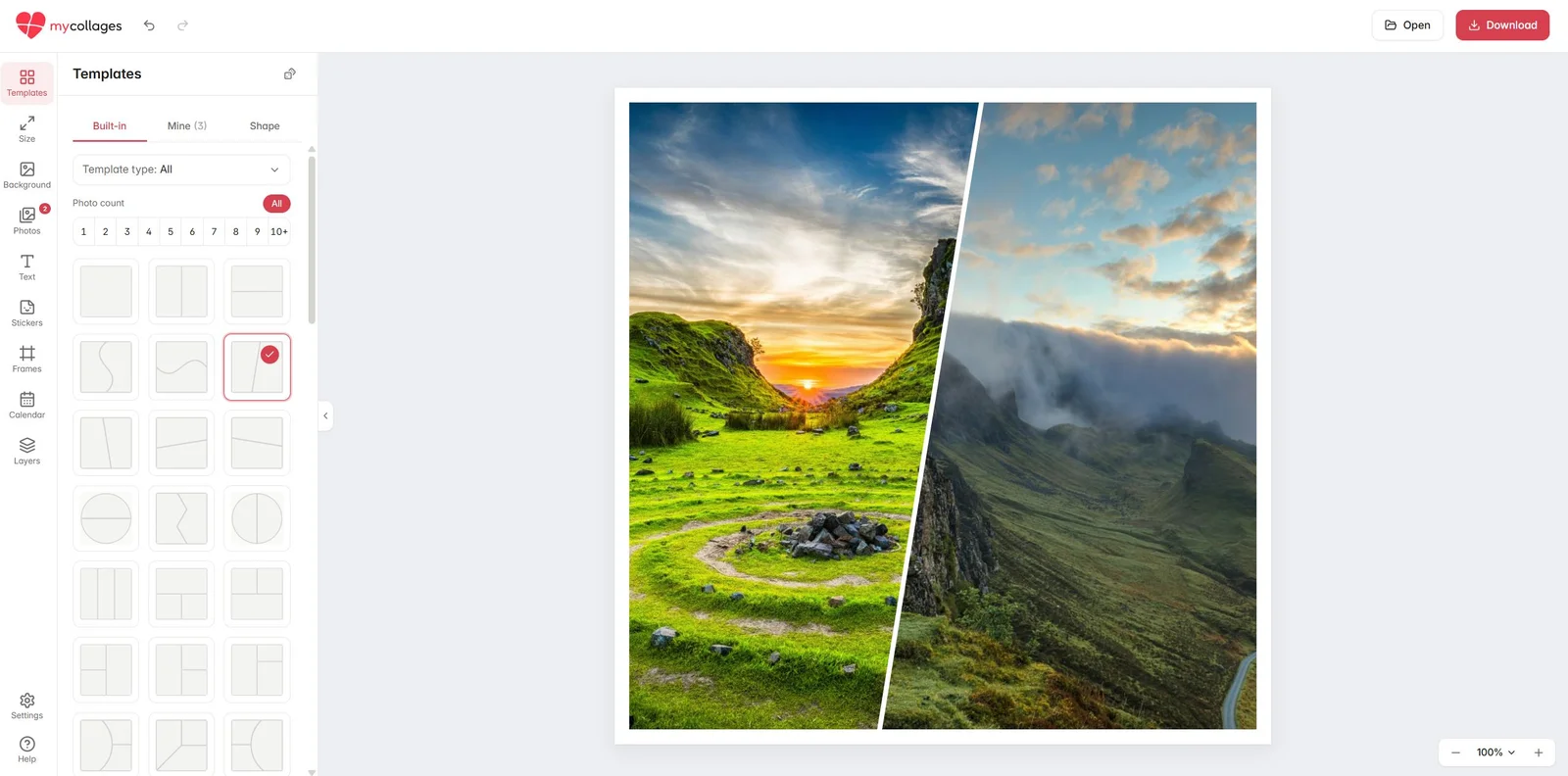
MyCollages is a browser-based photo collage maker that runs entirely on your own device. You drag photos into the window, pick a ready-made layout or build one yourself, arrange the shots, and save the result — with no account to create, no software to install, and no watermark on the finished file. What sets it apart from most free collage makers is where the work happens: your photos are never sent to a server and aren't kept once you close the tab, so a private album stays private. The service has been running since 2016 and is free throughout, with no paid tier, no export cap and no locked templates.
Key Features
- 85 ready-made layouts — 46 standard grid templates (even rows, strips, magazine mosaics, 2×2 and 3×3) and 39 creative templates whose cells are shapes: shards, waves, hearts, stars, petals and radial splits.
- Three builder modes — a rectangular grid where you set columns and rows and then drag, merge or split cells; a freeform mode for custom shapes; and a generator that lays out a template for your photo count in one click.
- Shape collages — fill a silhouette with your photos: a heart, star, circle, a number, or a word such as "LOVE".
- Themed photo frames — decorative borders for weddings, birthdays, kids, seasons and holidays including Christmas, Easter, Halloween and New Year.
- Photo calendar — wall or pocket calendars for the current and next year built from your own photos.
- Print-ready export — save as PNG, JPG, PDF at 300 DPI, or MP4, at any size you need.
- Nothing leaves your device — all rendering happens locally in the browser, with no upload and nothing retained after you close the tab.
How MyCollages Works
The flow is three steps. You drag photos straight into the browser window or pick them from your phone or computer — JPG, PNG, WebP, GIF, BMP and iPhone HEIC files are all accepted, up to 20 MB each. You then choose a template or build your own in the layout builder. Finally you save the result at whatever size you need, in one click and without a watermark.
Inside the editor, every shot can be moved, rotated and cropped within its cell, so a photo that doesn't quite fit a frame can be nudged instead of discarded. On top of the layout you can add a background in a flat colour, a gradient or a texture, captions and dates in any font, and photo filters that give a mixed set of images one consistent mood. The same editor works on a touchscreen, so you can lay out a collage with your finger on a phone or with a mouse on a large monitor.
Templates, Shapes and Frames
Rather than a single grid, MyCollages splits its catalogue into layouts built for different jobs. Standard templates are rectangular grids sorted by how many photos you have — pick "5 photos" and you get layouts like a left hero with a 2×2 block beside it, or a 2×2 block above a wide bottom panel. Creative templates replace those rectangles with shapes, producing collages that look composed rather than tiled. Photo frames sit over the whole collage as a decorative border for a specific occasion, and the template generator covers the case where nothing in the catalogue matches: describe the shape you want by drawing cells, or let it lay them out for you.
There is also a set of one-click tools for the small jobs people actually search for — combining two photos side by side, putting three photos in a row, cropping a photo into a circle, or dropping straight into a 2×2 or 3×3 grid.
Export Formats and Print Sizes
Collages export as PNG, JPG, PDF or MP4. For print, the PDF exports at 300 DPI and the canvas can be preset to standard sizes: A4 at 2480 × 3508 px, or a 20×30 photo print at 2362 × 3543 px. For screens there are platform-matched presets too, including a 2560 × 1440 px YouTube channel banner and a 1920 × 640 px VK community cover. Nothing is watermarked at any size, on any plan, because there is only one plan.
How to Make a Collage with MyCollages
- Open the editor and drag in your photos, or pick them from your device.
- Choose a standard grid, a creative shape template, or build your own in the builder.
- Drop each photo into a cell, then move, rotate or crop it to taste.
- Add a frame, background, caption or filter to finish the look.
- Export as PNG or JPG for the web, or as a 300 DPI PDF for print.
Who It's For
- Anyone making a quick photo grid for social media without installing an app
- People assembling a printed gift — a wedding, birthday or anniversary collage at A4 or 20×30
- Privacy-conscious users who don't want family photos uploaded to someone else's server
- Content creators who need a YouTube banner or social cover at exact dimensions
- Anyone who wants a shape collage — a heart, a number or a name spelled out in photos
Conclusion
MyCollages is a rare thing: a free tool that is actually free, with no account, no watermark and no export limit attached. Between 85 ready-made layouts, three builder modes, themed frames and 300 DPI print output, it covers most of what people open a collage maker for — and because everything renders in your browser, your photos stay on your own device from start to finish.
Featured Tools
Sponsored
Artlist
Royalty-free music, SFX, 8K footage, templates, LUTs and 100+ AI models on a single subscription for video creators.

Icons8
Large icon packs featuring over 10,000 icons for consistent design themes.

Vidu
AI video generator with text, image and reference-to-video modes, producing 3–16 second clips at up to 1080p with characters that stay consistent across shots.
Your tool here
The tools above are our own picks until the slots sell.
Spotlight
SponsoredRotates daily
Kittl
AI-first design platform with image, vector, and video generation, plus templates, mockups, and print-ready exports.
Tools we recommend


getimg.ai
20+ AI models for image, video & audio in one workspace


OpenArt
All-in-one AI image, video & audio generator


YouCam Online Editor
Free online AI photo & video editor
Editorially chosen. Some links above are affiliate links — if you sign up we may earn a commission, at no extra cost to you.
More Design Tools Tools


Pryzm
Pryzm is a real-time studio for designers who need backgrounds that don't look like everyone else's. Layer procedural gradients, then stack glass, grain, light and blobs.


Modeinspect
Mode turns your product’s codebase into editable canvas frames. Refine real UI with visual controls, experiment with AI then share or hand off for review.


GoProd
Remove backgrounds and upscale images effectively.


Kittl
AI-first design platform with image, vector, and video generation, plus templates, mockups, and print-ready exports.


Lunacy
Free design software enhanced with AI tools and built-in graphics.


Smart Upscaler
Automatically improve image clarity using AI technology.
Explore Other Categories
Discover more design resources
New to Design?
Explore our comprehensive design glossary to master essential terminology from A/B Testing to Wireframes.
Browse GlossaryLooking for something specific?
Search through our entire collection of design tools and resources