
Free online grid maker for artists and drawing learners. Add customizable grid overlays to reference images directly in your browser.
What it costs
- Free tier
- Yes
Completely free, browser-based tool with no account, no uploads and no paid plan.
Auto-checked on 8 August 2026Source
About OnlineGridMaker
OnlineGridMaker: Free Browser-Based Grid Overlay for Artists
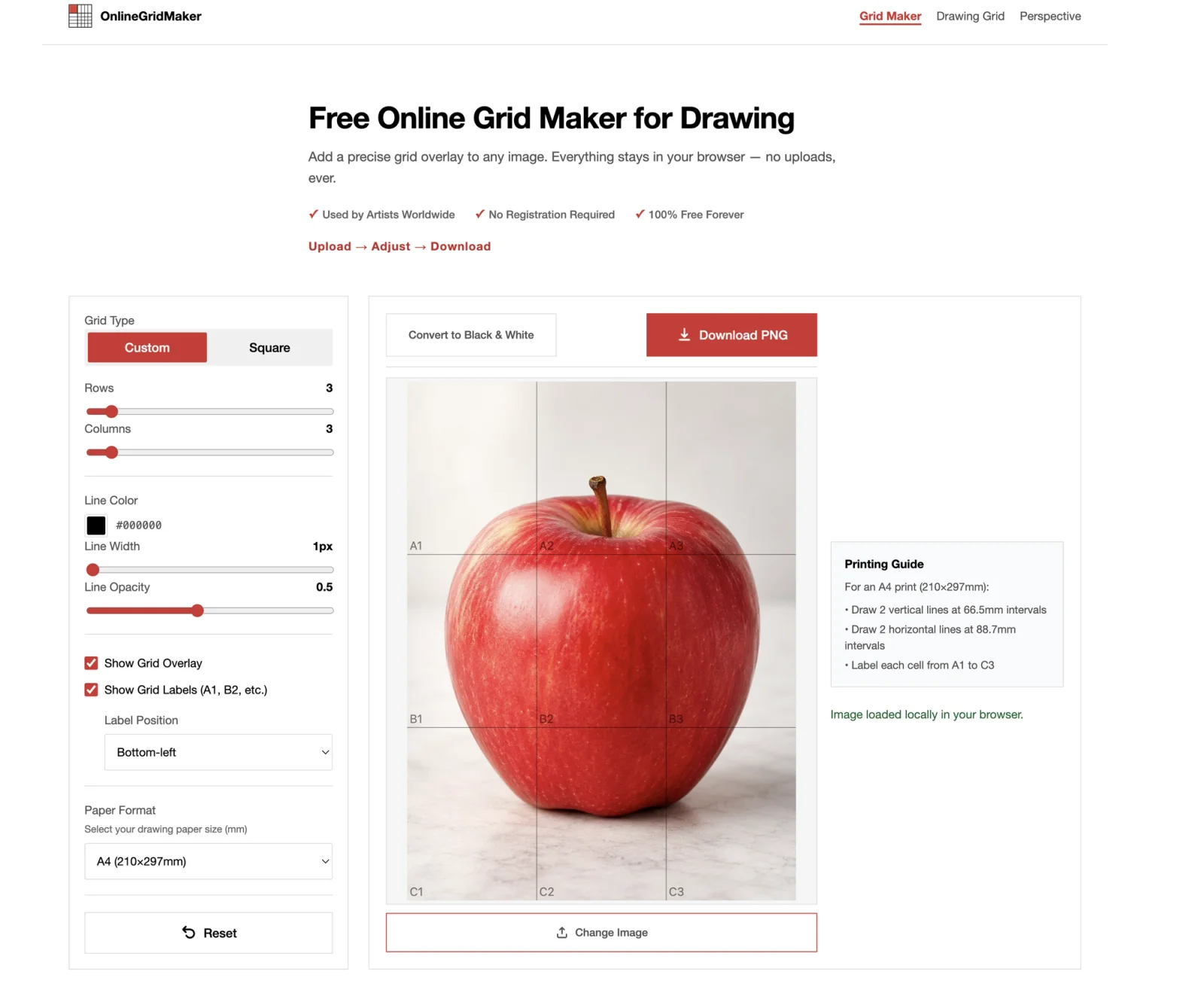
OnlineGridMaker is a free, no-signup tool that places a precise grid overlay over any reference image, helping artists transfer proportions accurately using the classic grid method. Everything runs entirely in the browser — images are never uploaded to a server — making it a fast, private way to prepare reference material for portrait, landscape, wildlife, comic, and architectural drawing.
Key Features
1. Fully Customizable Grids: Control rows, columns, line color, line width, and opacity to match any reference image or drawing style — from a loose 3×3 sketch grid to a detailed 12×16 layout for complex subjects.
2. Grid Cell Labels: Optional A1, B2-style coordinate labels make section-by-section copying easier, especially for beginners working on portraits or detailed studies.
3. Multiple Grid Types: Switch between square grids and custom rectangular layouts to match the aspect ratio of your subject.
4. Paper Format Presets: Snap the grid to standard drawing paper sizes — A3, A4, A5, Letter, Legal — or define a custom width and height in millimeters before printing.
5. Image Overlay & Black-and-White Conversion: Apply the grid directly on top of your source image and optionally convert to black and white for value studies.
6. PNG Export: Download the gridded reference as a clean PNG, ready to print or use on a tablet.
7. 100% Local Processing: Images stay on your device — nothing is uploaded, no account is required, and there are no usage limits.
8. Broad Format Support: Accepts JPG, PNG, WebP, and static GIF files up to 100MB and 30 megapixels.
Who It's For
OnlineGridMaker is built for traditional and digital artists who use the grid method to scale and transfer references. It suits:
- Portrait, figure, and wildlife artists who need accurate proportions
- Landscape and plein-air painters preparing studio references
- Comic and illustration artists laying out panels
- Architecture and perspective students mapping out city scenes
- Beginners learning to measure and translate proportions
Benefits for Users
1. Privacy by Default: Because all processing happens client-side, sensitive or commissioned reference images never leave the browser.
2. No Friction: No account, no paywall, no watermark — open the site, upload, adjust, download.
3. Print-Ready Output: Paper-size presets and grid density recommendations make it easy to produce a reference that lines up with the physical paper on your desk.
4. Adaptable Detail: Start with a simple 3×3 grid for fast placement and increase density only when the subject demands more measuring points.
Conclusion
OnlineGridMaker strips the grid-method workflow down to its essentials: upload, configure, download. By keeping everything local and free, it removes the usual friction of online art tools and gives artists a reliable way to scale references for any drawing surface — from a sketchbook page to a large canvas.
Featured Tools
Sponsored
Artlist
Royalty-free music, SFX, 8K footage, templates, LUTs and 100+ AI models on a single subscription for video creators.

Icons8
Large icon packs featuring over 10,000 icons for consistent design themes.

Vidu
AI video generator with text, image and reference-to-video modes, producing 3–16 second clips at up to 1080p with characters that stay consistent across shots.
Your tool here
The tools above are our own picks until the slots sell.
Spotlight
SponsoredRotates daily
GoProd
Remove backgrounds and upscale images effectively.
Tools we recommend


getimg.ai
20+ AI models for image, video & audio in one workspace


OpenArt
All-in-one AI image, video & audio generator


YouCam Online Editor
Free online AI photo & video editor
Editorially chosen. Some links above are affiliate links — if you sign up we may earn a commission, at no extra cost to you.
More Design Tools Tools


Pryzm
Pryzm is a real-time studio for designers who need backgrounds that don't look like everyone else's. Layer procedural gradients, then stack glass, grain, light and blobs.


Modeinspect
Mode turns your product’s codebase into editable canvas frames. Refine real UI with visual controls, experiment with AI then share or hand off for review.


GoProd
Remove backgrounds and upscale images effectively.


Kittl
AI-first design platform with image, vector, and video generation, plus templates, mockups, and print-ready exports.


Lunacy
Free design software enhanced with AI tools and built-in graphics.


Smart Upscaler
Automatically improve image clarity using AI technology.
Explore Other Categories
Discover more design resources
New to Design?
Explore our comprehensive design glossary to master essential terminology from A/B Testing to Wireframes.
Browse GlossaryLooking for something specific?
Search through our entire collection of design tools and resources