

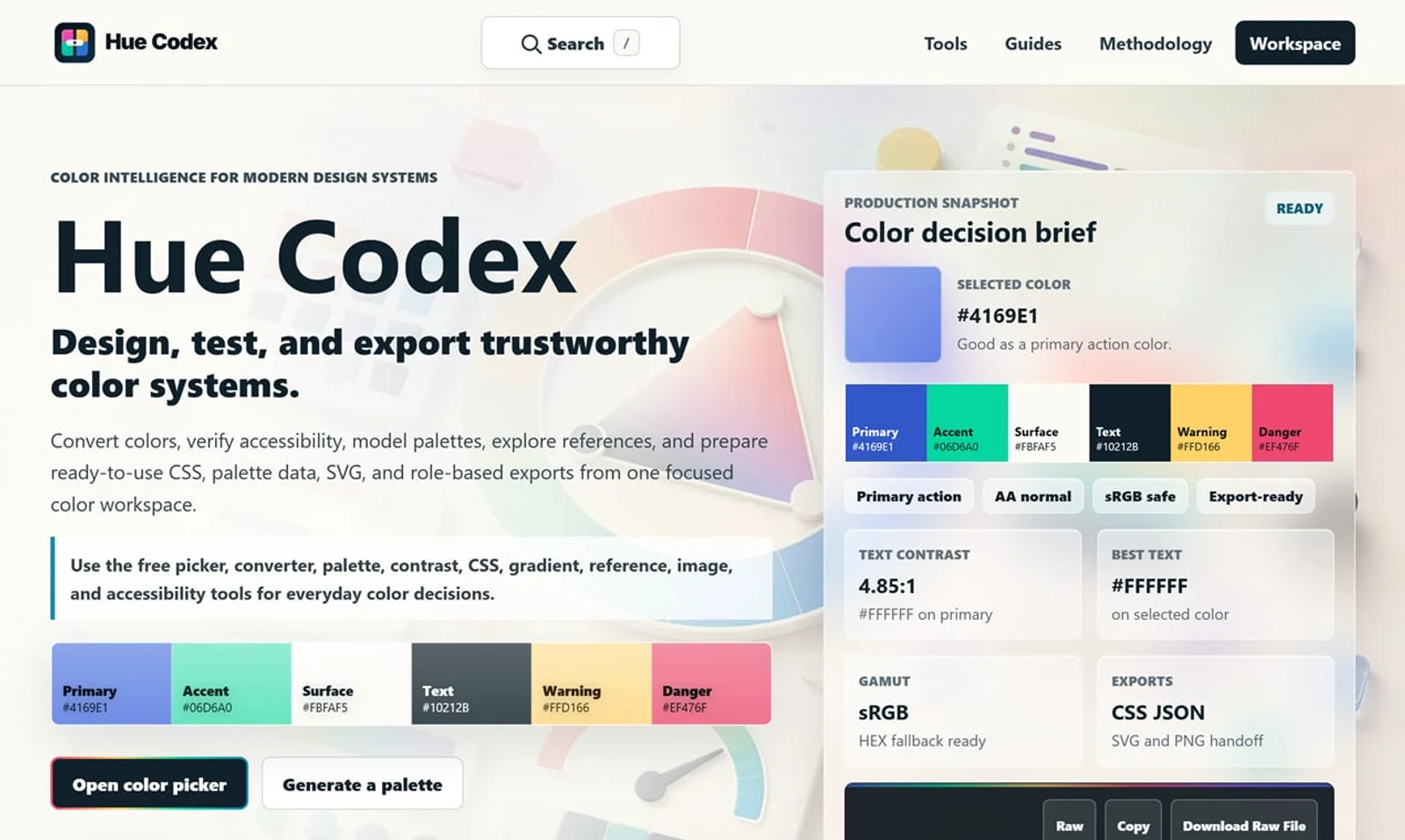
Hue Codex is a free, no-account color workspace for designers and developers, with palette generation, WCAG contrast checks, modern CSS tools, image color extraction, local saving, and exports.
What it costs
- Free tier
- Yes
Fully free with no account required; optional paid accounts, team features and some advanced exports are on the roadmap but not yet available or priced.
Auto-checked on 8 August 2026Source
About Hue Codex
About Hue Codex
What Is Hue Codex?
Hue Codex is a free, browser-based color workspace for designers and developers. It brings color picking, conversion, palette creation, accessibility testing, modern CSS output, image sampling, gradients, local saving, and practical color reference material into one connected experience.
No account is required. Users can begin with a color, inspect it across modern and traditional color models, test how it performs in real interface contexts, build a role-based palette, and export the result for design or development work.
What Hue Codex Does
Hue Codex provides tools for the full color workflow:
- Pick and inspect colors using HEX, RGB, HSL, HWB, Lab, LCH, OKLab, OKLCH, and other production formats.
- Convert colors between web, perceptual, and color-science models.
- Generate role-based palettes with primary, secondary, accent, surface, text, border, success, warning, and danger colors.
- Lock useful palette colors while regenerating the remaining roles.
- Check foreground and background combinations against WCAG AA, AAA, large-text, and interface contrast targets.
- Find readable text colors and accessible pairings within a palette.
- Simulate common color-vision differences and review focus-ring and link-color visibility.
- Generate CSS variables, modern CSS color syntax, gradients, Sass maps, JSON, token-style data, SVG strips, PNG palettes, and handoff summaries.
- Extract palettes or exact pixel colors from images processed locally in the browser.
- Build tints, shades, tones, lightness scales, harmonies, mixed colors, opacity combinations, and gradient palettes.
- Explore guides, glossary definitions, CSS named colors, color-model comparisons, and transparent calculation methodology.
A Connected Color Workflow
Hue Codex is designed as one workspace rather than a collection of disconnected calculators. Colors and settings can move directly between related tools, reducing the need to repeatedly copy and re-enter values.
A designer can select a color, convert it to OKLCH, check its contrast, use it as the seed of a palette, generate CSS variables, and share the exact configured result through a URL.
Tool states can be shared without an account, allowing another person to open the same color, palette, contrast pair, or gradient with its settings intact.
Local Saving Without an Account
Hue Codex includes a browser-local workspace for saving useful color work without registration. Users can retain presets, pinned colors, palettes, contrast pairs, gradients, image samples, and recent exports on their own device.
Workspace data can also be exported as a .huecodex.json file and imported into another browser later. This provides portability without requiring cloud storage or an online account.
Transparent Methodology
Hue Codex documents how its color conversions, WCAG contrast checks, palette generation, gamut checks, color-difference measurements, image processing, gradients, and exports work.
The methodology distinguishes between:
- Standards-backed calculations
- Hue Codex recommendations and heuristics
- Approximate results
- Browser-dependent behavior
- Known limitations
Core color conversion and contrast calculations use deterministic logic rather than generative AI, helping results remain repeatable and explainable.
How Hue Codex Can Be Used
UI and UX designers can build role-based interface palettes, test text and component contrast, create state colors, and prepare implementation handoffs.
Frontend developers can convert modern CSS colors, generate variables and fallbacks, create gradients, inspect gamut behavior, and copy structured values into a codebase.
Brand and logo designers can explore harmonies, create palette systems, extract colors from reference images, compare similar colors, and document color roles.
Accessibility practitioners can review text contrast, non-text interface contrast, focus indicators, links, readable pairings, and color-vision differences.
Students and newer designers can use the integrated guides, glossary, named-color reference, and methodology pages to understand both the practical and technical sides of color.
Who Is Hue Codex For?
Hue Codex is designed for:
- UI and UX designers
- Web and frontend developers
- Graphic and brand designers
- Logo designers
- Design-system teams
- Accessibility specialists
- Freelancers and agencies
- Students learning color theory or CSS color
- Anyone who needs dependable, reusable color decisions
Hue Codex is free to use, requires no account, and works directly in the browser.
Featured Tools
Sponsored
Artlist
Royalty-free music, SFX, 8K footage, templates, LUTs and 100+ AI models on a single subscription for video creators.

Icons8
Large icon packs featuring over 10,000 icons for consistent design themes.

Vidu
AI video generator with text, image and reference-to-video modes, producing 3–16 second clips at up to 1080p with characters that stay consistent across shots.
Your tool here
The tools above are our own picks until the slots sell.
Spotlight
SponsoredRotates daily
Kittl
AI-first design platform with image, vector, and video generation, plus templates, mockups, and print-ready exports.
More Color Tools Tools


Upclimb Color Picker
A free browser-based tool for designers & clients to decide on color schemes. Pick & save colors, generate color palettes, extract website colors, check WCAG contrast & find passing colors.


Adobe Color
Create and explore color themes and trends with an inspirational tool.


Alphredo
Generate translucent colors that match their opaque versions.


Atmos
Easily create effective UI color palettes.


Cheeky Palettes
Find color palette inspiration in real-world context.

Chroma
Browser extension for color picking and palette building.
Explore Other Categories
Discover more design resources
New to Design?
Explore our comprehensive design glossary to master essential terminology from A/B Testing to Wireframes.
Browse GlossaryLooking for something specific?
Search through our entire collection of design tools and resources