
A free browser-based tool for designers & clients to decide on color schemes. Pick & save colors, generate color palettes, extract website colors, check WCAG contrast & find passing colors.
What it costs
- Free tier
- Yes
Free with no paid tier, no download and no account for any of the five modes — Upclimb, a web design agency, publishes it as a public resource. The trade-off is that saved colors live in your browser's local storage rather than an account, so they don't sync between browsers or devices and clearing site data removes them.
Auto-checked on 12 August 2026Source
About Upclimb Color Picker
Upclimb Color Picker: A Free Online HEX, RGB, HSL and HWB Color Tool
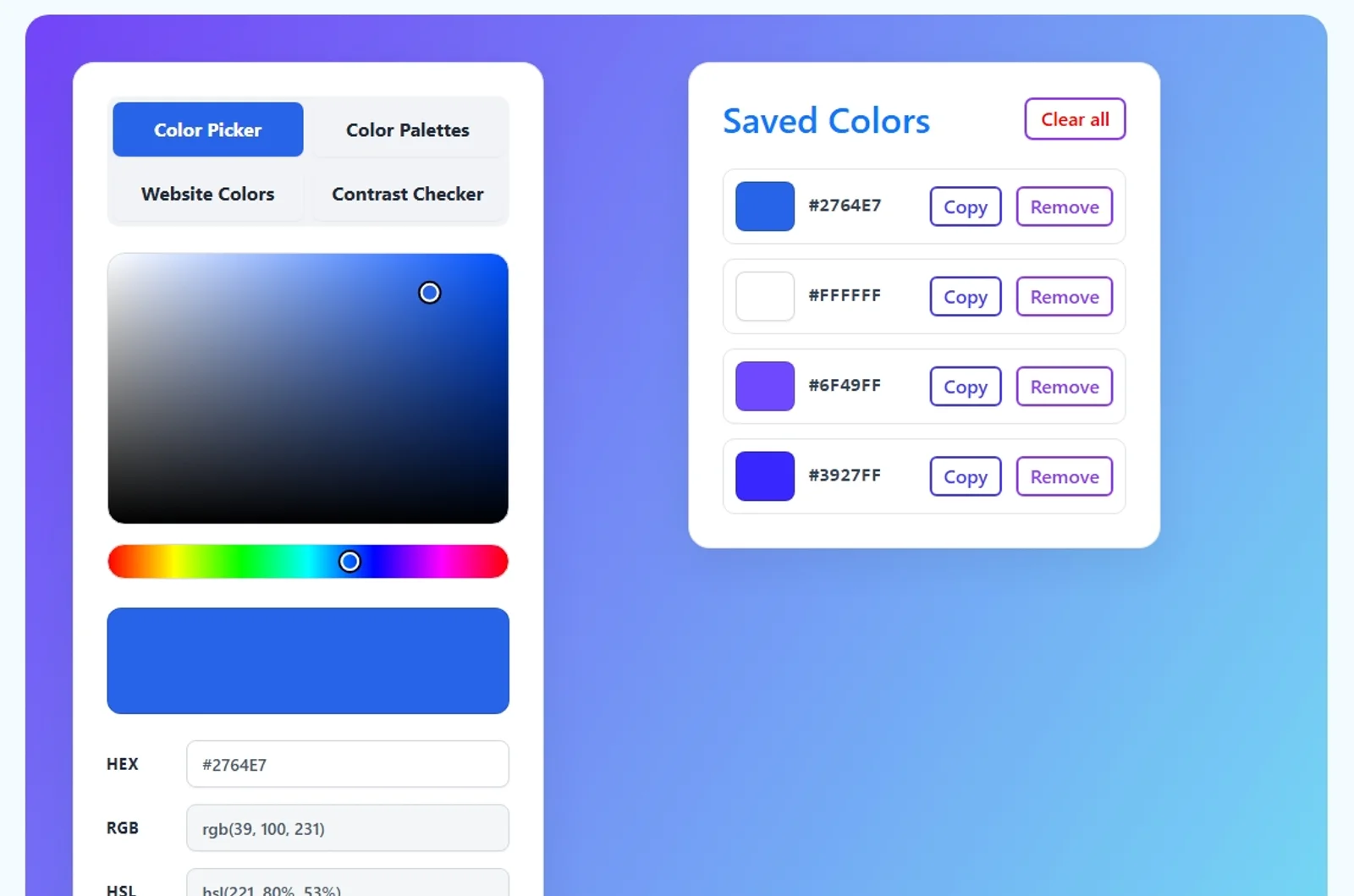
The Upclimb Color Picker is a free, browser-based color tool that does more than hand you a HEX code. Pick a color visually or type a HEX value, and it instantly shows the HEX, RGB, HSL and HWB representations of the same color. From there, four more modes sit behind tabs in the same interface: a palette generator that builds harmonious color schemes, a website color extractor that pulls the CSS colors out of any public page, a WCAG 2.2 contrast checker that tells you whether a foreground and background pair is actually readable, and a saved-colors panel that keeps your working set to hand while you move between the other tools. There is nothing to install and no account to create.
Key Features
- Color picker — Select a color visually or enter a HEX value and get its HEX, RGB, HSL and HWB codes updating live, with one-click copy.
- Color palette generator — Build complementary, analogous, triadic, split-complementary and tetradic palettes from any base color, then copy or save individual results.
- Website color extractor — Enter the URL of a public page and pull the CSS colors defined in its HTML and linked stylesheets, normalized and ranked so the prominent ones surface first.
- WCAG contrast checker — Test a foreground and background pair against WCAG 2.2 AA and AAA thresholds for normal text, large text and non-text interface elements.
- Passing color suggestions — When a pair fails, the checker proposes nearby colors that reach your target ratio while preserving the original hue and chroma as closely as it can.
- Saved colors — Keep a running list of colors that persists across all five modes while you work.
- Embeddable — A copy-paste embed code lets you drop the whole tool into your own webpage.
HEX, RGB, HSL and HWB Color Formats
One digital color can be written several ways, and the picker shows four of the formats used in modern CSS side by side, so you can copy whichever one your project needs:
- HEX — Red, green and blue channels written in hexadecimal, e.g. #2764E7. Compact and the default in most CSS and design handoffs.
- RGB — The same three channels in decimal, e.g. rgb(39 100 231). Useful when you are working directly with screen color channels.
- HSL — Hue, saturation and lightness, e.g. hsl(221 80% 53%). Easier when you want to shift a color systematically rather than channel by channel.
- HWB — Hue plus whiteness and blackness, e.g. hwb(221 15% 9%). A different way to describe how much white or black is mixed into a hue.
These are four descriptions of the same displayed sRGB color, not four different colors — which is exactly why seeing them together is useful when you are moving a value between a design file, a stylesheet and a brand document.
Generating Complementary and Harmonious Color Palettes
The palette generator takes the hue of your selected color and rotates it around the color wheel by fixed amounts, keeping saturation and lightness intact. That gives you five classic color-harmony relationships: complementary (the hue opposite yours), analogous (neighbouring hues in 30-degree steps), triadic (three hues evenly spaced), split-complementary (your color plus the two hues either side of its complement) and tetradic (four hues forming two complementary pairs). Any result can be copied, saved to your color list, or promoted to the new base color to explore further. Harmony formulas are a starting point rather than an answer, so it is worth running the important pairs through the contrast checker before you commit them to a design.
Checking Color Contrast for Accessible Design
The contrast checker calculates the relative luminance of each color and compares the two, then grades the pair against the thresholds that matter for web accessibility: 4.5:1 for WCAG AA normal text, 3:1 for AA large text and non-text interface elements, 7:1 for AAA normal text and 4.5:1 for AAA large text. It accepts HEX, RGB/RGBA, HSL/HSLA, HWB and named CSS colors, and it handles two things many free checkers skip: transparent colors are composited over an underlying canvas color before the ratio is calculated, and a failing result is never rounded up to a pass — 4.499:1 does not satisfy a 4.5:1 requirement. When a pair fails, the tool suggests the nearest passing colors so you change the design as little as possible. A passing ratio covers only the two colors tested; it is not a claim that the whole page is WCAG compliant.
Extracting the Colors From a Website
Website Colors mode is a CSS color inspector. Give it a public URL and it fetches that page along with a limited number of its directly linked stylesheets, then collects the color values it finds in text colors, backgrounds, borders, gradients, custom properties, inline styles and SVG styling, normalizing them into a consistent, reusable list. The scan is deliberately bounded: it does not crawl the rest of the site, execute the page's JavaScript, reach private network addresses, or download every asset. Because it reads code rather than rendered pixels, a frequently declared color is not necessarily the one that dominates the design, and colors that exist only inside photographs will not show up at all. That makes it well suited to auditing an existing CSS color system, capturing brand colors, or researching a redesign.
How to Use the Upclimb Color Picker
- Pick a color in the main picker, or type a HEX value straight into the HEX field.
- Copy the HEX, RGB, HSL or HWB value you need, or hit Save color to keep it in your list.
- Switch to Color Palettes to generate complementary, analogous, triadic, split-complementary or tetradic combinations from that base color.
- Use Website Colors to pull the CSS palette out of a live page you want to reference.
- Run your key foreground and background pairs through the Contrast Checker, and take a suggested passing color if a pair falls short.
Pricing
The Upclimb Color Picker is free, with no paid tier, no download and no account required for any of the five modes. Upclimb, a web design and digital marketing agency, publishes it as a public resource. The trade-off for having no account is that saved colors live in your browser's local storage rather than on a server: they stay put while you work, but they do not sync between browsers or devices, and clearing your site data (or working in a private window) can remove them. Website color extraction is the one part that runs server-side, since a browser cannot read another site's stylesheets on its own.
Who It's For
- Web designers picking colors, building palettes and checking contrast before applying them to a design
- Front-end developers copying CSS-ready color codes and converting between HEX, RGB, HSL and HWB
- Accessibility reviewers who need a fast WCAG AA/AAA check that handles transparency correctly
- Marketing and brand teams keeping a working list of brand colors and sharing exact values with designers
- Students and educators exploring color formats, hue relationships and the maths behind contrast ratios
Conclusion
Most free online color pickers stop at the HEX code. Upclimb's keeps that first interaction just as simple, then adds the four things you usually reach for next — palettes, a website color audit, a proper WCAG 2.2 contrast check with passing suggestions, and a place to keep the colors you have chosen — in a single free page with no sign-up. If you want one browser tab that covers picking, planning and pressure-testing a color scheme, it is a genuinely useful bookmark.
Featured Tools
Sponsored
Artlist
Royalty-free music, SFX, 8K footage, templates, LUTs and 100+ AI models on a single subscription for video creators.

Icons8
Large icon packs featuring over 10,000 icons for consistent design themes.

Vidu
AI video generator with text, image and reference-to-video modes, producing 3–16 second clips at up to 1080p with characters that stay consistent across shots.
Your tool here
The tools above are our own picks until the slots sell.

More Color Tools Tools


Hue Codex
Hue Codex is a free, no-account color workspace for designers and developers, with palette generation, WCAG contrast checks, modern CSS tools, image color extraction, local saving, and exports.


Adobe Color
Create and explore color themes and trends with an inspirational tool.


Alphredo
Generate translucent colors that match their opaque versions.


Atmos
Easily create effective UI color palettes.


Cheeky Palettes
Find color palette inspiration in real-world context.

Chroma
Browser extension for color picking and palette building.
Explore Other Categories
Discover more design resources
New to Design?
Explore our comprehensive design glossary to master essential terminology from A/B Testing to Wireframes.
Browse GlossaryLooking for something specific?
Search through our entire collection of design tools and resources