

Combine a world clock, time zone converter, and meeting scheduler online.
What it costs
- Free tier
- Yes
Free world clock / time-zone converter (free sign-in to save settings); no paid plan shown on the page.
Auto-checked on 8 August 2026Source
About World Time Buddy
What Is World Time Buddy?
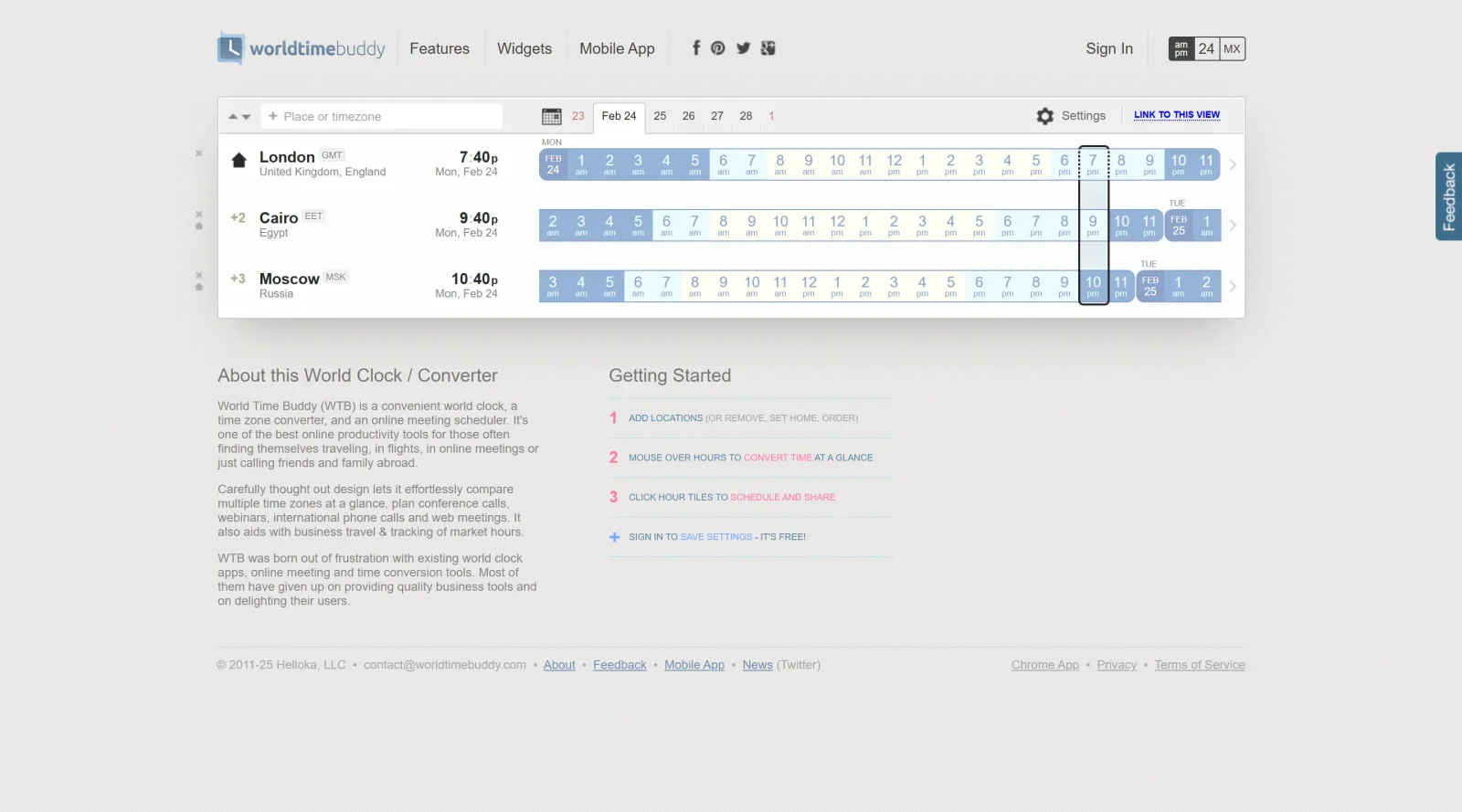
World Time Buddy is a free online tool that combines a world clock, time zone converter, and meeting scheduler. It enables users to compare times across multiple locations simultaneously, supporting project management tasks in distributed teams. Available as a browser-based application, mobile app, and widget, World Time Buddy fits into design workflows where collaboration spans different time zones, such as coordinating remote design reviews or developer stand-ups.
What World Time Buddy Does
- Displays current times for multiple cities and time zones in a single view using hour columns.
- Converts times between locations with a glance down aligned hour tiles.
- Highlights optimal meeting windows based on work hours across selected time zones.
- Supports calendar integration to overlay availability and avoid scheduling conflicts.
- Handles daylight saving time changes with automatic updates and advance warnings.
- Allows customization of display options, including 12/24-hour formats and location grouping.
How World Time Buddy Can Be Used
- Designers coordinating feedback sessions with international clients select locations like New York, London, and Tokyo to identify overlapping work hours for live calls.
- Remote development teams use the hour grid to schedule daily stand-ups, dragging to highlight shared availability across continents.
- Project managers planning webinars or async handoffs integrate calendars to check event overlaps before confirming times.
- Freelance creators traveling abroad add custom locations to track deadlines relative to their home base and client zones.
- Teams embedding the widget on project dashboards for quick time checks during sprint planning.
Who Is World Time Buddy For?
World Time Buddy serves remote workers, project managers, and distributed design and development teams handling cross-time-zone collaboration. It suits roles involving frequent international meetings, such as UI/UX designers on global projects, product managers aligning stakeholders, or developers in agile sprints with offshore members. Experience level is not a barrier, as the visual interface requires no advanced setup. Visit World Time Buddy
World Time Buddy pros and cons
- Hover over the hour tiles to convert one time across every city you've added at once
- Drag across hours to pick a meeting slot, then open it in a calendar, copy it or share an event page
- Warns a week before daylight saving changes and highlights weekends, including non-Sat/Sun ones
- Every feature is free: paid subscriptions were discontinued in May 2022
- Embeddable clock and event widgets show times in each visitor's detected time zone
- Renaming locations and grouping them into tabs require signing in with Google, Facebook or email
- Ad-supported, with a consent prompt for personalized advertising and ad measurement
- Scope stops at time conversion and slot picking, with no availability polls, booking links or tasks
World Time Buddy is a time-zone converter and meeting-slot picker rather than a project management tool. It fits distributed design teams, freelancers with overseas clients and anyone planning calls across several cities: add locations, scan the aligned hour tiles, then drag to select a slot and hand it to a calendar or a shareable event page. Every feature has been free since paid subscriptions ended in 2022. The site carries ads, and signing in saves settings and unlocks renamed or grouped locations. If you need attendees to vote on times, public booking links or task tracking, pair it with a dedicated scheduling or project tool.
Frequently asked questions
Is World Time Buddy free?
Yes. Its announcements page says paid subscriptions were discontinued on May 5, 2022 and all features are now open to everyone. Signing in is also free and saves your settings.
Does World Time Buddy account for daylight saving time?
Yes. It uses the industry-standard TZDATA database for time zone offsets and daylight saving rules, and shows a warning a week before a change.
Does World Time Buddy work with Google Calendar?
You can overlay your Google Calendar above the hour tiles to find open slots, enabled under Settings. A selected time range can also be opened in calendar apps, copied to the clipboard or published as a shareable event page.
Is there a World Time Buddy mobile app?
Yes. The site links to iOS and Android apps, listed on the App Store as Time Buddy. Its mobile page says the in-app upgrade can now be unlocked free of charge.
Featured Tools
Sponsored
Artlist
Royalty-free music, SFX, 8K footage, templates, LUTs and 100+ AI models on a single subscription for video creators.

Icons8
Large icon packs featuring over 10,000 icons for consistent design themes.

Vidu
AI video generator with text, image and reference-to-video modes, producing 3–16 second clips at up to 1080p with characters that stay consistent across shots.
Your tool here
The tools above are our own picks until the slots sell.
Spotlight
SponsoredRotates daily
Business Characters
Detailed and vibrant 3D people illustrations to enhance your work.
More Project Management Tools


Air
Experience visual browsing with powerful search, secure sharing, and smooth collaboration.


Asana
Manage projects and adapt to changing priorities in remote work settings.


Basecamp
Comprehensive toolkit for effective remote working.


Bubbles
Initiate discussions by commenting on any on-screen content.


Campsite
A dedicated space for design teams to manage work-in-progress.


Canva Whiteboards
Canva Whiteboards for creative brainstorming and teamwork.
Explore Other Categories
Discover more design resources
New to Design?
Explore our comprehensive design glossary to master essential terminology from A/B Testing to Wireframes.
Browse GlossaryLooking for something specific?
Search through our entire collection of design tools and resources