
Mysterious generator creating color palettes using polar coordinates.
What it costs
- Free tier
- Yes
Scraped GitHub Pages URL returned a 404; Poline is a free open-source color-palette library with no paid tier.
Auto-checked on 8 August 2026Source
About Poline
What Is Poline?
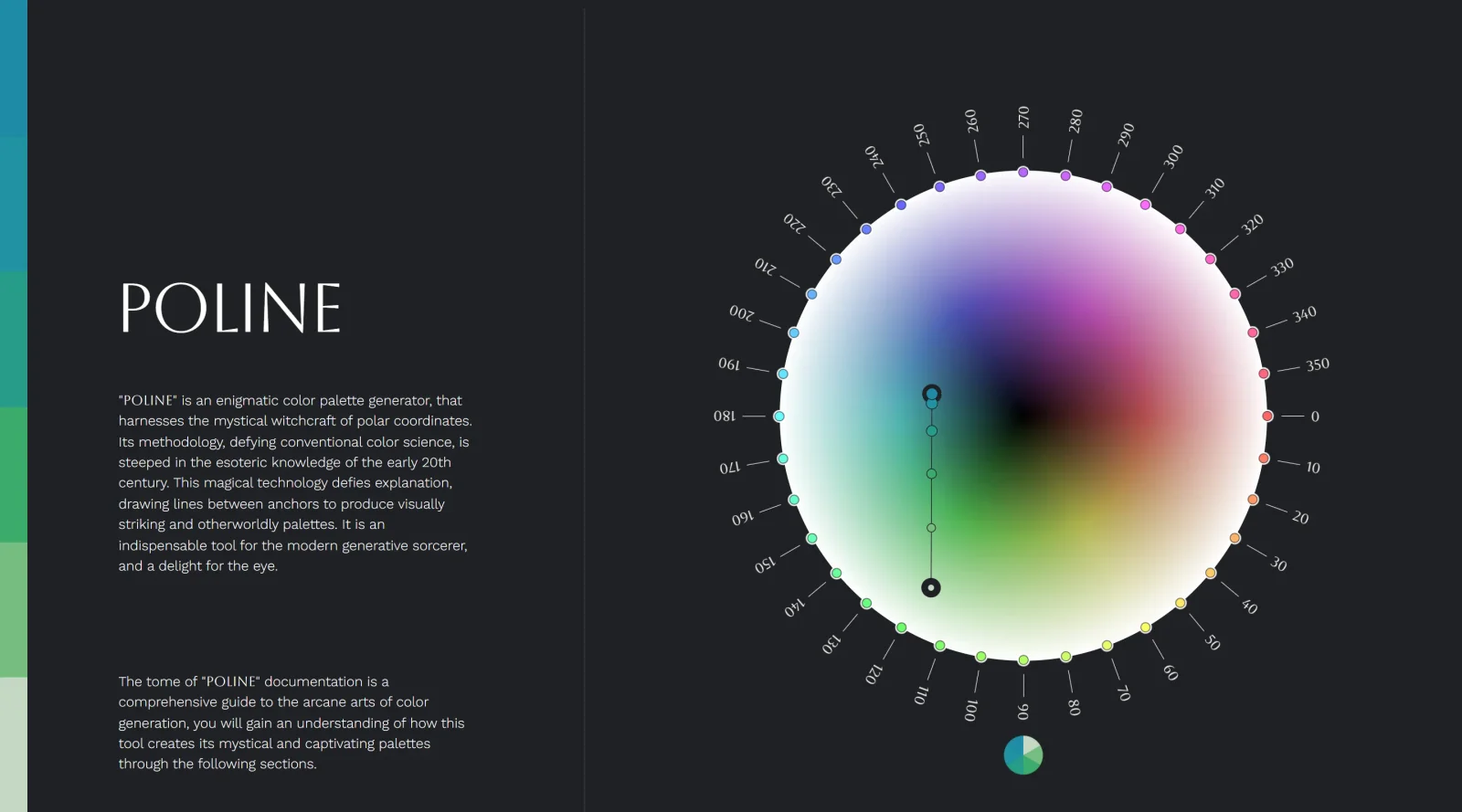
Poline is a free, open-source color palette generator that uses polar coordinates to create harmonious color schemes. Written in TypeScript and available as a lightweight, dependency-free JavaScript library, Poline generates color palettes by drawing lines between anchor points in polar HSL color space. Rather than applying simple linear blending between colors, Poline calculates transitions using polar coordinate mathematics, producing visually distinctive and expressive palettes suited for UI design, data visualization, and generative creative work.
What Poline Does
- Generates color palettes by interpolating between user-defined anchor colors using polar coordinates
- Allows customization of color distribution through position functions (linear, sinusoidal, quadratic) for each axis
- Produces a specified number of colors between anchors, with control over palette density and spread
- Supports closed-loop palettes and inverted lightness options for varied aesthetic outcomes
- Outputs colors in multiple formats, including CSS-ready color values for immediate design application
- Operates as a micro-library with minimal dependencies, making it suitable for integration into larger design tools and workflows
How Poline Can Be Used
- Generating perceptually distinct color sets for data visualization charts and dashboards
- Creating cohesive color systems for user interface design by defining a few base colors and letting Poline interpolate the full range
- Building generative design systems where color palettes are algorithmically produced based on input parameters
- Developing dynamic color schemes for creative and artistic projects that require non-traditional color transitions
- Establishing brand color systems that maintain harmony and visual balance across multiple applications
Who Is Poline For?
Poline serves designers and developers who need to generate color palettes programmatically or who want more control over color relationships than traditional palette generators offer. It is particularly valuable for those working on generative design projects, data visualization, design systems, and applications where color harmony and mathematical control are priorities. Developers can integrate Poline into their projects via its JavaScript library, while designers can interact with it through its web interface. The tool works well for both individual designers exploring color theory and teams building scalable design systems. Visit Poline
Poline pros and cons
- MIT-licensed, dependency-free JavaScript library, installable from npm or loaded from a CDN
- Nine easing-style position functions, set per axis, shape how colors spread between anchors
- Returns HSL arrays or CSS strings in hsl, lch and oklch, and can sample any point along the palette
- Token Beam export syncs the live palette into Figma, Aseprite, Blender or Adobe XD
- The browser playground mirrors the library and shows the matching setup code
- Works in HSL out of the box; other color models need a second library such as culori
- The keyboard-driven playground is, by the author's own note, best used on desktop
- Export is a copyable list of hex values or a Token Beam session, not a downloadable palette file
Poline is a palette tool for people who work in code: a small MIT-licensed JavaScript library that draws paths between anchor colors in polar HSL space, with an interactive playground on top. Its appeal is control, from per-axis easing functions to closed loops and hue shifting, which suits generative art and any project where palettes are built programmatically. Designers who just want to pick and save a palette will find the playground engaging but light on export options, and anyone who needs OKLCH or another perceptual model as the working space should plan to add a conversion library. The project won a Swiss Design Award in 2026.
Frequently asked questions
Is Poline free?
Yes. Poline is open source under the MIT license and installable from npm, and the online playground is free to use with no account.
How does Poline generate color palettes?
It places anchor colors on a polar HSL color wheel and draws lines between them, sampling a set number of points along each line. Position functions such as sinusoidal (the default), linear or arc control how those colors are spread.
Can I use Poline palettes in Figma?
Yes, through Token Beam: the playground's export panel gives you a session token to paste into the Token Beam plugin in Figma, Aseprite, Blender or Adobe XD, and color changes sync live. You can also copy hex values from the export list.
What color formats does Poline output?
The library returns colors as HSL arrays or as CSS strings in hsl, lch or oklch. It works in HSL internally, and the docs suggest a library such as culori for converting to other color models.
Featured Tools
Sponsored
Artlist
Royalty-free music, SFX, 8K footage, templates, LUTs and 100+ AI models on a single subscription for video creators.

Icons8
Large icon packs featuring over 10,000 icons for consistent design themes.

Vidu
AI video generator with text, image and reference-to-video modes, producing 3–16 second clips at up to 1080p with characters that stay consistent across shots.
Your tool here
The tools above are our own picks until the slots sell.
Spotlight
SponsoredRotates daily
Glyph Neue
Over 1,500 icons in SVG and PNG formats, free with attribution.
More Color Tools Tools


Hue Codex
Hue Codex is a free, no-account color workspace for designers and developers, with palette generation, WCAG contrast checks, modern CSS tools, image color extraction, local saving, and exports.


Upclimb Color Picker
A free browser-based tool for designers & clients to decide on color schemes. Pick & save colors, generate color palettes, extract website colors, check WCAG contrast & find passing colors.


Adobe Color
Create and explore color themes and trends with an inspirational tool.


Alphredo
Generate translucent colors that match their opaque versions.


Atmos
Easily create effective UI color palettes.


Cheeky Palettes
Find color palette inspiration in real-world context.
Explore Other Categories
Discover more design resources
New to Design?
Explore our comprehensive design glossary to master essential terminology from A/B Testing to Wireframes.
Browse GlossaryLooking for something specific?
Search through our entire collection of design tools and resources